Recent Updates Page 17 Toggle Comment Threads | Keyboard Shortcuts

  • Unknown's avatar

    Wang 21:26 on 2019-01-14 Permalink | Reply
    Tags: , , , , , ,   

    Monitoring by Datadog 

    We have thousands of containers running on hundreds of servers, so we need comprehensive monitoring system to monitor service and server metrics.

    We investigated popular cloud monitoring platform: New Relic and Datadog, finally we decided to use datadog.

    Dashboard: Datadog could  detect services and configure dashboards for you automatically.

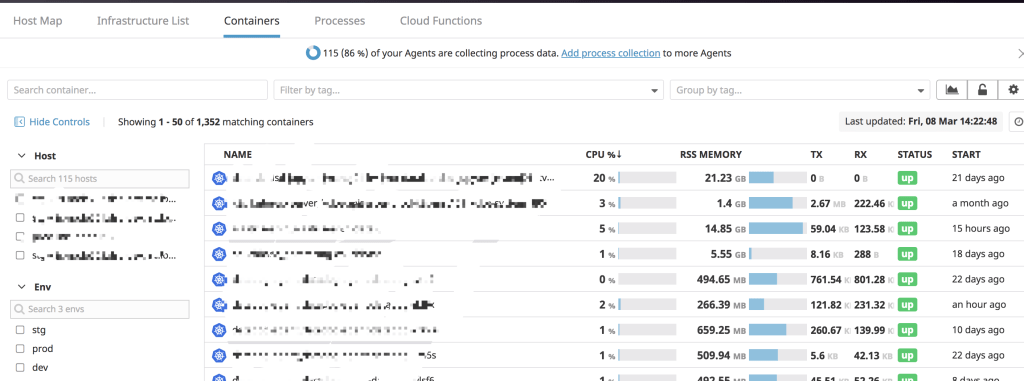
    Container & Process: You could check all your containers & process in all environments clearly.
    Monitors: Datadog will create monitors according to service type automatically, if it doesn’t your requirement, you could create your own. It’s also convenient to send alert message through Slack, Email.

    APM: Datadog provide various charts for API analysis, also there’s Service Map which you could check service dependencies.

    Synthetics: New feature in Datadog which could test your API around the world to check availability and uptime.
     
  • Unknown's avatar

    Wang 19:22 on 2018-12-12 Permalink | Reply
    Tags: , ,   

    My Girl! 👍👍👍

     
  • Unknown's avatar

    Wang 21:44 on 2018-11-20 Permalink | Reply
    Tags: , , , , , ,   

    Sticky session in Kubernetes 

    As we know RESTful API is stateless, every request will be forward to backend server by round robin mechanism.

    But in some scenario we need sticky session which means request from one client should be forward to one backend server.

    After checking kubernetes documentation we added some annotations under ingress configuration, and it works well.

    annotations:
      nginx.ingress.kubernetes.io/affinity: "cookie"
      nginx.ingress.kubernetes.io/session-cookie-name: "router"
      nginx.ingress.kubernetes.io/session-cookie-hash: "sha1"
    

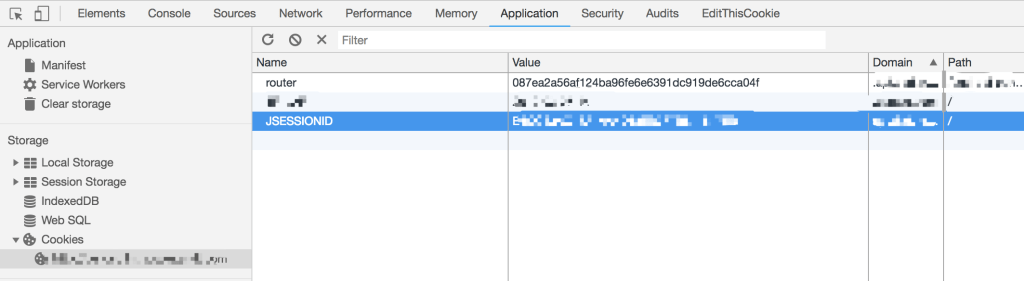
    If you open Developer Tools in Chrome, you will find the cookie.

     
  • Unknown's avatar

    Wang 22:21 on 2018-11-05 Permalink | Reply
    Tags: , , , , , , , ,   

    [Presto] Secure with LDAP 

    For security issue we decided to enable LDAP in presto, to deploy presto into kubernetes cluster we build presto image ourselves which include kerberos authentication and LDAP configurations.

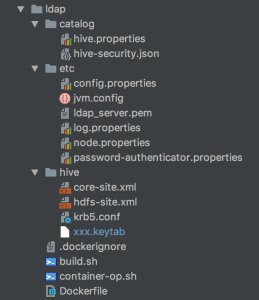
    As you see the image structure, configurations under catalog/etc/hive are very important, please pay attention.

    krb5.conf and xxx.keytab are used to connect to kerberos

    password-authenticator.properties and ldap_server.pem under etc, hive.properties and hive-security.json under catalog are used to connect to LDAP.

    password-authenticator.properties

    password-authenticator.name=ldap
    ldap.url=ldaps://<IP>:<PORT>
    ldap.user-bind-pattern=xxxxxx
    ldap.user-base-dn=xxxxxx
    

    hive.properties

    connector.name=hive-hadoop2
    hive.security=file
    security.config-file=<hive-security.json>
    hive.metastore.authentication.type=KERBEROS
    hive.metastore.uri=thrift://<IP>:<PORT>
    hive.metastore.service.principal=<SERVER-PRINCIPAL>
    hive.metastore.client.principal=<CLIENT-PRINCIPAL>
    hive.metastore.client.keytab=<KEYTAB>
    hive.config.resources=core-site.xml, hdfs-site.xml
    

    hive-security.json

    {
      "schemas": [{
        "user": "user_1",
        "schema": "db_1",
        "owner": false
      }, {
        "user": " ",
        "schema": "db_1",
        "owner": false
      }, {
        "user": "user_2",
        "schema": "db_2",
        "owner": false
      }],
      "tables": [{
        "user": "user_1",
        "schema": "db_1",
        "table": "table_1",
        "privileges": ["SELECT"]
      }, {
        "user": "user_1",
        "schema": "db_1",
        "table": "table_2",
        "privileges": ["SELECT"]
      }, {
        "user": "user_2",
        "schema": "db_1",
        "table": ".*",
        "privileges": ["SELECT"]
      }, {
        "user": "user_2",
        "schema": "db_2",
        "table": "table_1",
        "privileges": ["SELECT"]
      }, {
        "user": "user_2",
        "schema": "db_2",
        "table": "table_2",
        "privileges": ["SELECT"]
      }],
      "sessionProperties": [{
        "allow": false
      }]
    }
    
     
  • Unknown's avatar

    Wang 22:12 on 2018-10-27 Permalink | Reply
    Tags: , , ,   

    Team Building!

     
  • Unknown's avatar

    Wang 22:30 on 2018-10-15 Permalink | Reply
    Tags: , , , ,   

    Jenkins pipeline & kubernetes 

    We build deployment pipeline by Jenkins, Git, Maven, Docker, JFrog, Kubernetes, Slack, below is overall process:

    develop -> create branch -> push code -> git hook -> jenkins build -> code check -> unit test -> docker build -> push docker image -> deploy -> notificationa
    

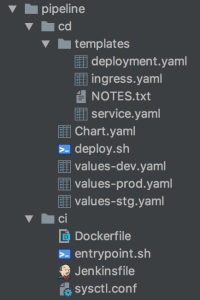
    For every project we generate pipeline scripts by JHipster like this:

    ci contains docker related scripts, cd contains kubernetes related scripts.

    We configured Jenkins to scan projects from git automatically which followed naming rule, if any changes on git, Jenkins will pull the code and start building.

     
  • Unknown's avatar

    Wang 22:43 on 2018-10-08 Permalink | Reply
    Tags: , , , , , , ,   

    Nginx ingress in kubernetes 

    There are 3 ways to expose your service: NodePort, LoadBalancer, Ingress, next I will introduce about how to use ingress.

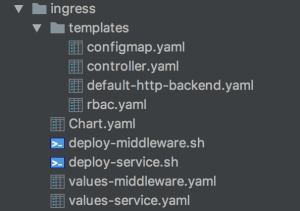
    1.Deploy ingress controller

    You need deploy ingress controller at first which will start nginx pods, then nginx will bind domains and listen to the requests.

    I built a common ingress chart for different service, I only need change values-<service>.yaml and deploy script if any changes.

    Another key point is that you must be clear about ingress-class, different service use different ingress-class, it will be quite messy if you mistake them.

    args:
      - /nginx-ingress-controller
      - --default-backend-service=$(POD_NAMESPACE)/default-http-backend
      - --configmap=$(POD_NAMESPACE)/nginx-configuration
      - --tcp-services-configmap=$(POD_NAMESPACE)/tcp-services
      - --udp-services-configmap=$(POD_NAMESPACE)/udp-services
      - --ingress-class={{ .Values.server.namespace }}
      - --sort-backends=true
    

    2.Configure service ingress

    Next we need configure service ingress which will append nginx server configuration dynamically.

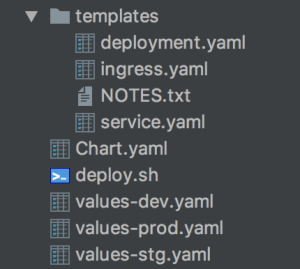
    I also built a service chart which include environment configurations, Jenkins & Helm will use different values-<env>.yaml when execute pipeline deployment.

    Ingress example:

    apiVersion: extensions/v1beta1
    kind: Ingress
    metadata:
      name: {{ .Values.app.name }}{{ .Values.deploy.subfix }}
      namespace: {{ .Values.app.namespace }}
      annotations:
        kubernetes.io/ingress.class: "{{ .Values.ingress.class }}"
        kubernetes.io/tls-acme: "true"
        nginx.ingress.kubernetes.io/enable-cors: "false"
        nginx.ingress.kubernetes.io/rewrite-target: /
        nginx.ingress.kubernetes.io/proxy-body-size: 10m
    spec:
      rules:
      - host: {{ .Values.ingress.hostname }}
        http:
          paths:
          - path: {{ .Values.ingress.path }}
            backend:
              serviceName: {{ .Values.app.name }}{{ .Values.deploy.subfix }}
              servicePort: {{ .Values.container.port }}


  • Unknown's avatar

    Wang 20:54 on 2018-09-15 Permalink | Reply
    Tags: ,   

    Finally get!

     
  • Unknown's avatar

    Wang 21:23 on 2018-09-06 Permalink | Reply
    Tags: , , , ,   

    Probe in kubernetes 

    There’s two kinds of probe: readinessProbe, livenessProbe in kubernetes used to detect if your service is healthy.

    We encountered a problem when configured readinessProbe, there’s a property named initialDelaySeconds which indicate kubernetes will start health check after specific second, we used the default value 60 which means kubernetes will check health after 60 seconds.

    readinessProbe:
      initialDelaySeconds: 60
      timeoutSeconds: 5
    

    As we deployed over 20 StatefulSet pods and these pods joined as a cluster which cost over 60 seconds, kubernetes can’t ping service successfully so that kubernetes restart these pods, thees pods restart in loop all the time.

    After we increased the initialDelaySeconds to 120, everything goes fine.

     
  • Unknown's avatar

    Wang 21:56 on 2018-08-22 Permalink | Reply
    Tags: , , , ,   

    Stateful deployment in kubernetes 

    If you deploy pod by setting “kind: Deployment“, you will lost your data when the pod restart or being deleted.

    It’s not acceptable when we want to deploy storage system like Redis, Elasticsearch, in this case we need use StatefulSet.

    For the concrete explanation please refer to the official documentation, StatefulSet use PVC(Persistent Volume Claim) as storage, and it will exist all the time no matter what happened to the pod.

    You must specify PVC in StatefulSet’s yaml file like this:

    volumeClaimTemplates:
    - metadata:
      name: redis
    spec:
      accessModes: [ "ReadWriteOnce" ]
      storageClassName: fast
      resources:
        requests:
          storage: 10Gi
    

    Please also pay attention to PVC’s name, there’s a rule for StatefulSet and PVC name mapping which IS NOT covered by documentation.

     
c
Compose new post
j
Next post/Next comment
k
Previous post/Previous comment
r
Reply
e
Edit
o
Show/Hide comments
t
Go to top
l
Go to login
h
Show/Hide help
shift + esc
Cancel