Recent Updates Page 18 Toggle Comment Threads | Keyboard Shortcuts

  • Unknown's avatar

    Wang 19:25 on 2018-08-11 Permalink | Reply
    Tags: , , , , ,   

    Auto scaling in kubernetes 

    When we deploy a API in kubernets we must define replication number for the pod, but as we know there will be high traffic during peak time and we usually can’t estimate service capacity exactly at first time, in this case we must scale our service like creating more pods to share online traffic to avoid service crash down.

    We usually scale service manually before using kubernetes, append more nodes during peak time and destroy nodes when the traffic became smooth.

    In kubernetes there’s a kind of feature called HPA(Horizontal Pod Autoscaler) which could help your scale service automatically. You could specify minimum and maximum replica number in yaml file, HPA will monitor pod’s CPU and Memory by collecting pod’s metric, if HPA found your pod’s metric is over the threshold number which you defined in yaml file, it will create more pods automatically and join the service cluster to load the traffic.

    Here is a simple HPA samle:

    apiVersion: autoscaling/v2beta1
    kind: HorizontalPodAutoscaler
    metadata:
      name: hpa-demo
      namespace: test-ns
      labels:
        app: hpa-demo
        component: api
    spec:
      scaleTargetRef:
        apiVersion: apps/v1
        kind: Deployment
        name: hpa-demo
      minReplicas: 3
      maxReplicas: 10
      metrics:
      - type: Resource
        resource:
          name: memory
          targetAverageUtilization: 75
      - type: Resource
        resource:
          name: cpu
          targetAverageUtilization: 75
    

    I defined there’s will be at least 3 replicas for the pod, if the CPU or Memory usage is over 75%, HPA will create at most 10 pods.

    HPA monitor pod’s metric by using metrics-server.
     
  • Unknown's avatar

    Wang 22:03 on 2018-07-30 Permalink | Reply
    Tags: , ,   

    Deploy service by Helm in Kubernets 

    As we know, if you want to deploy a service, you need at first write several yaml files like deployment/service/ingress file and so on.

    Then execute several times kubectl create -f <Yaml File> when you create service, also you need delete several times when you destroy service, It’s a little boring…

    Although you could write all the configurations in just one yaml file, but it’s hard to maintain. For example you can’t define variable which used in many pods, you can’t upgrade or rollback deployment easily..

    By using Helm you will find it’s very easy to solve these problems, just execute one command like helm install <Chart>, then helm will deploy all the pods at meanwhile, you could check deployment’s status by helm list, upgrade service by helm upgrade and so on.

    There’s lots of stable charts in Helm repository, you could also define chart yourself if it doesn’t meet your requirement.

    Here is chart’s structure from Helm official website:

    wordpress/
      Chart.yaml          # A YAML file containing information about the chart
      LICENSE             # OPTIONAL: A plain text file containing the license for the chart
      README.md           # OPTIONAL: A human-readable README file
      requirements.yaml   # OPTIONAL: A YAML file listing dependencies for the chart
      values.yaml         # The default configuration values for this chart
      charts/             # A directory containing any charts upon which this chart depends.
      templates/          # A directory of templates that, when combined with values,
                          # will generate valid Kubernetes manifest files.
      templates/NOTES.txt # OPTIONAL: A plain text file containing short usage notes
    
     
  • Unknown's avatar

    Wang 21:47 on 2018-07-27 Permalink | Reply
    Tags: , ,   

    Build kubernetes cluster 

    As you know kubernetes is the most popular container orchestration tool which helps us deploy/manage/scale container and service more easily.

    We deploy kubernetes cluster by kuberspray which could help us build production ready cluster very fast and provide many convenient tools. Before start deploying you must configure SSH key between nodes.

     
  • Unknown's avatar

    Wang 19:34 on 2018-07-18 Permalink | Reply
    Tags: ,   

    JHipster, good scaffolding tool! https://www.jhipster.tech/

     
  • Unknown's avatar

    Wang 20:16 on 2018-07-04 Permalink | Reply
    Tags: ,   

    [Gatling] API test report 

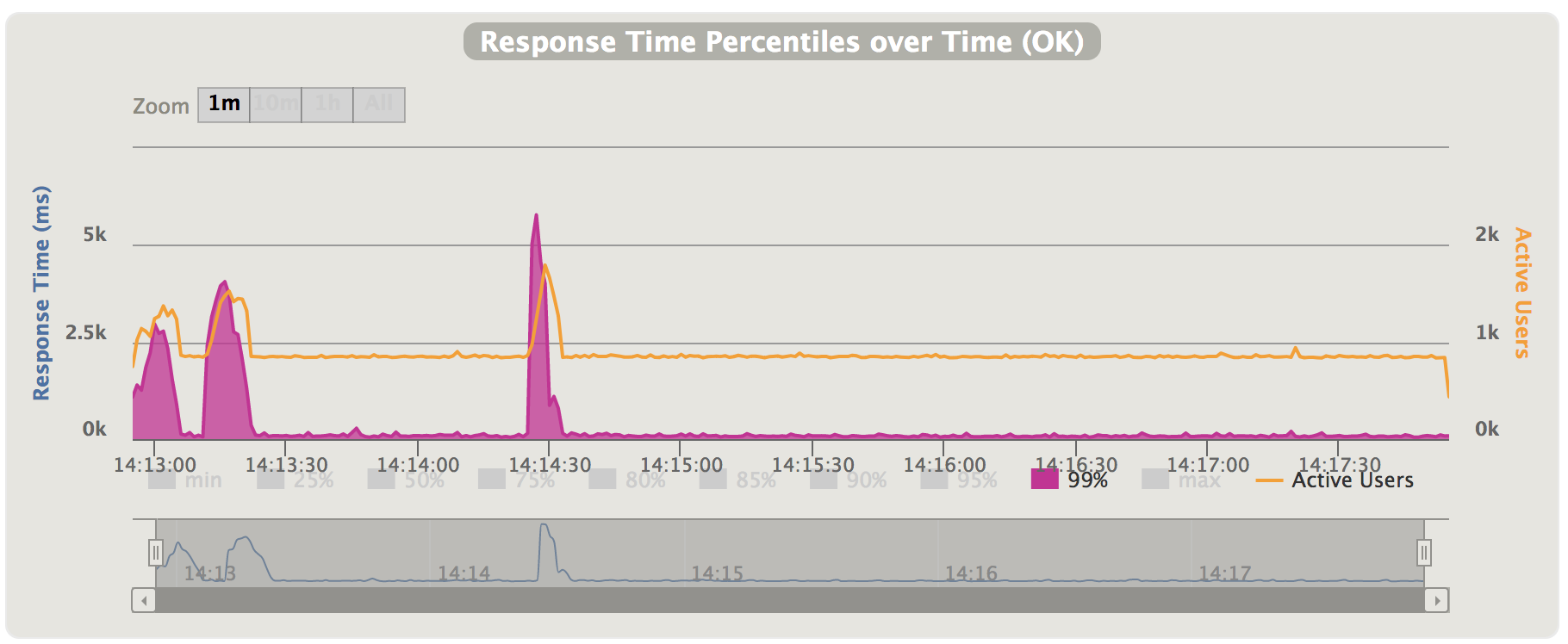
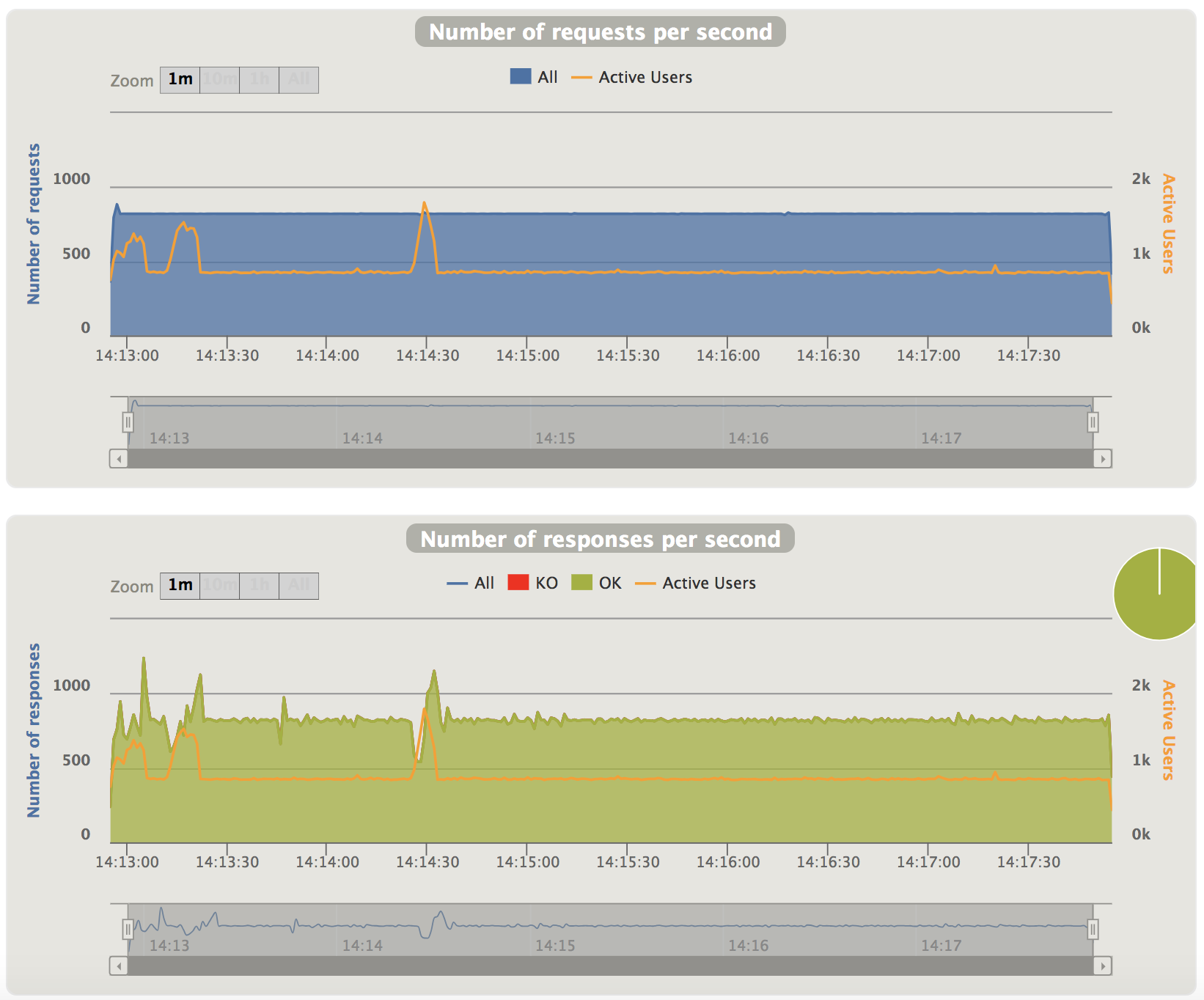
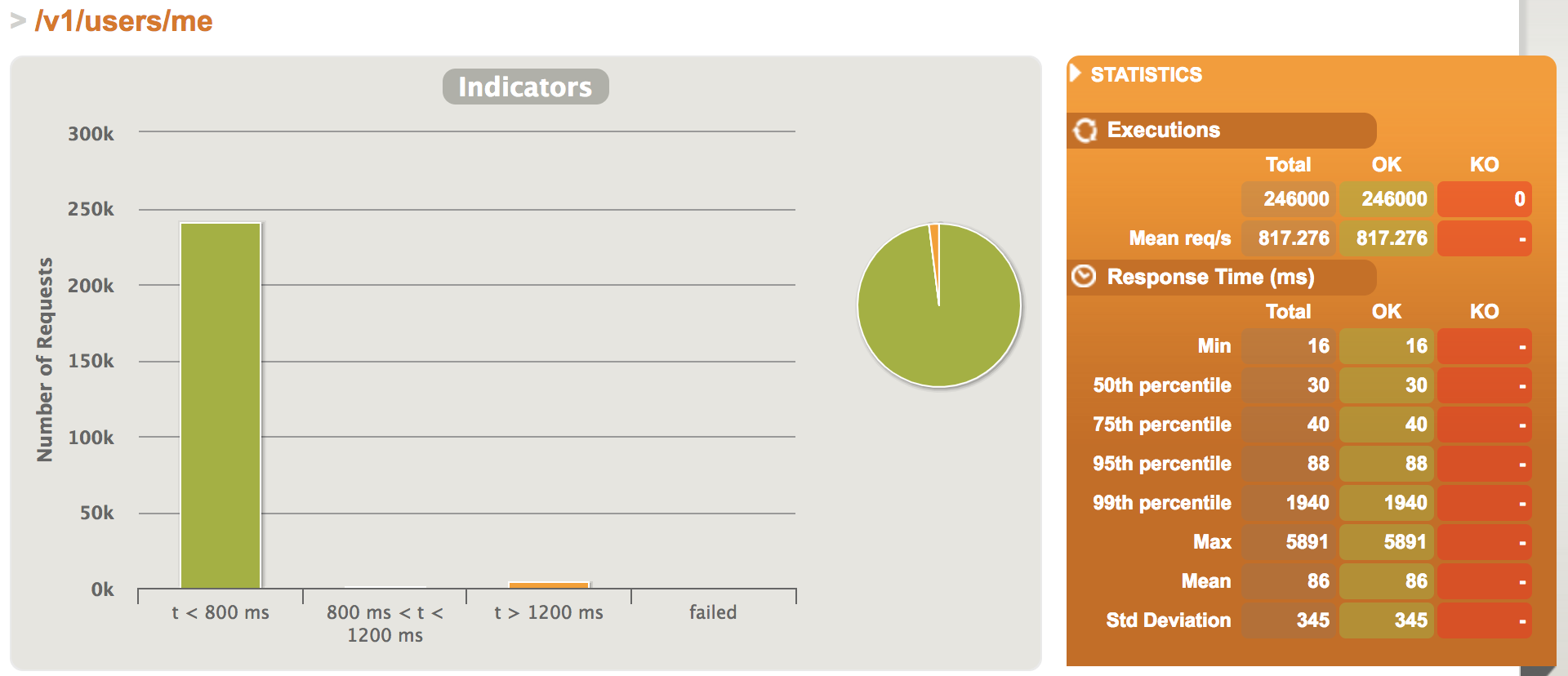
    Recent I did performance test on user API, I simulated sending 246K requests during 300 seconds.

    1.Test Report

    ================================================================================
    ---- Global Information --------------------------------------------------------
    > request count                                     246000 (OK=246000 KO=0     )
    > min response time                                     16 (OK=16     KO=-     )
    > max response time                                   5891 (OK=5891   KO=-     )
    > mean response time                                    86 (OK=86     KO=-     )
    > std deviation                                        345 (OK=345    KO=-     )
    > response time 50th percentile                         30 (OK=30     KO=-     )
    > response time 75th percentile                         40 (OK=40     KO=-     )
    > response time 95th percentile                         88 (OK=88     KO=-     )
    > response time 99th percentile                       1940 (OK=1940   KO=-     )
    > mean requests/sec                                817.276 (OK=817.276 KO=-     )
    ---- Response Time Distribution ------------------------------------------------
    > t < 800 ms                                        240565 ( 98%)
    > 800 ms < t < 1200 ms                                1110 (  0%)
    > t > 1200 ms                                         4325 (  2%)
    > failed                                                 0 (  0%)
    ================================================================================


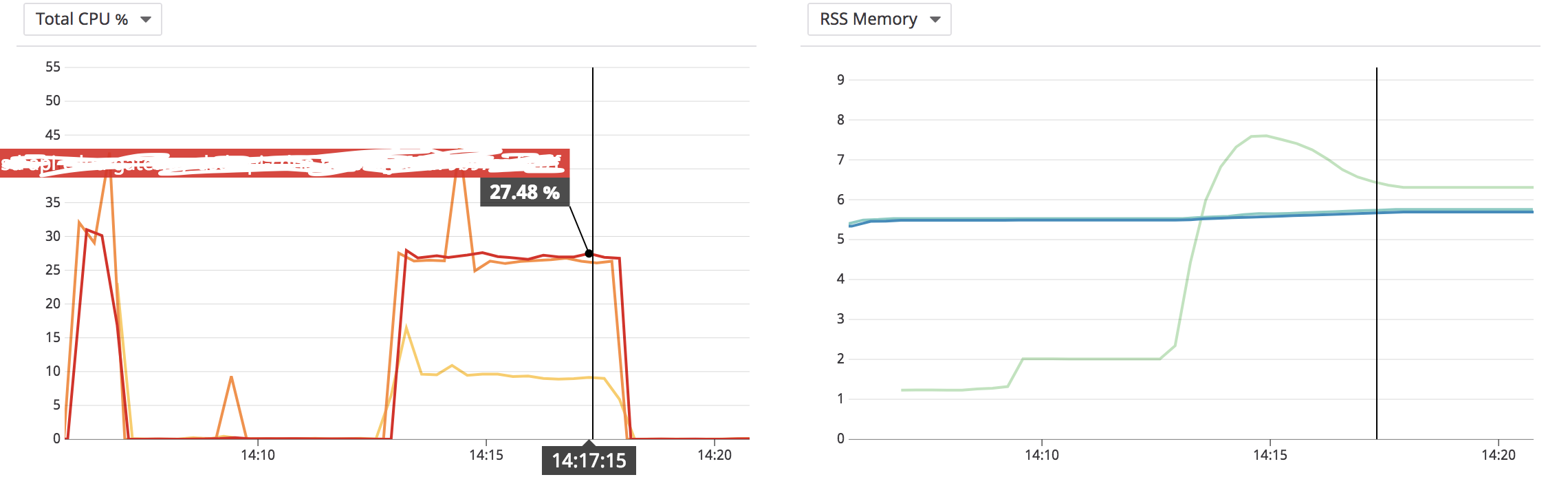
    2.Server Status

    I did the test on server which the network latency is quite low, if I did the test from external environment, I think the QPS will decrease several times.

     
  • Unknown's avatar

    Wang 21:38 on 2018-06-30 Permalink | Reply
    Tags: , , , ,   

     
  • Unknown's avatar

    Wang 23:12 on 2018-06-28 Permalink | Reply
    Tags: ,   

    [ELK] Enable X-Pack in ELK stack 6.3 

    We konw X-Pack is is an extension that bundles security, monitoring, reporting, and graph capabilities into one package.

    From ELK stack 6.3, X-Pack is integrated into Elasticsearch, you can try it by 30-day-trial license. After the trail you could choose buy the license or downgrade to the normal license.

    ES

    1.Down & Unzip & Enter

    wget https://artifacts.elastic.co/downloads/elasticsearch/elasticsearch-6.3.2.tar.gz
    tar -zvxf elasticsearch-6.3.2.tar.gz && cd elasticsearch-6.3.2
    

    2.Enable monitor & Start

    echo "xpack.monitoring.enabled: true" >>config/elasticsearch.yml
    echo "xpack.security.enabled: true" >>config/elasticsearch.yml
    echo "xpack.watcher.enabled: true" >>config/elasticsearch.yml
    echo "xpack.ml.enabled: true" >>config/elasticsearch.yml
    echo "xpack.graph.enabled: true" >>config/elasticsearch.yml
    echo "xpack.monitoring.collection.enabled: true" >>config/elasticsearch.yml
    
    bin/elasticsearch
    

    Kibana

    1.Download & Unzip & Entry

    wget wget https://artifacts.elastic.co/downloads/kibana/kibana-6.3.2-darwin-x86_64.tar.gz
    tar -zvxf kibana-6.3.2-darwin-x86_64.tar.gz && cd kibana-6.3.2-darwin-x86_64
    

    2.Start

    bin/kibana
    

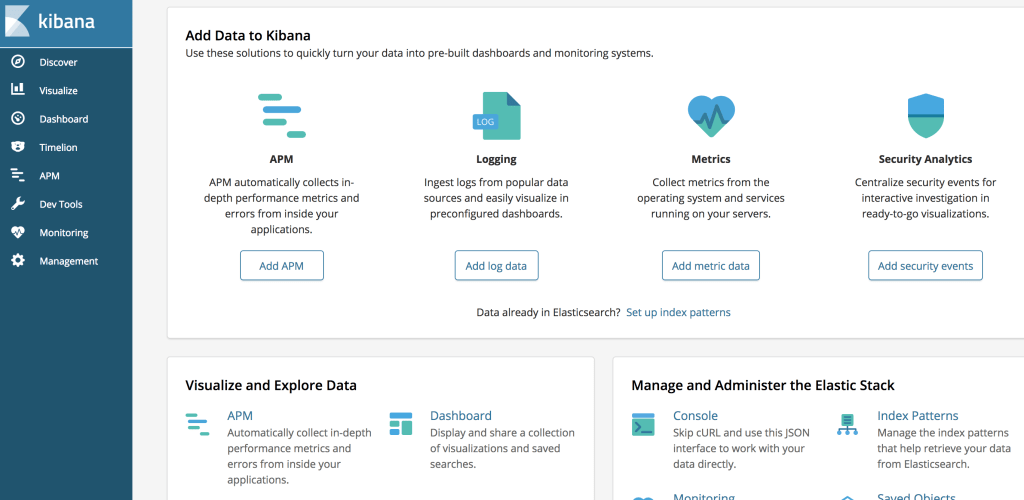
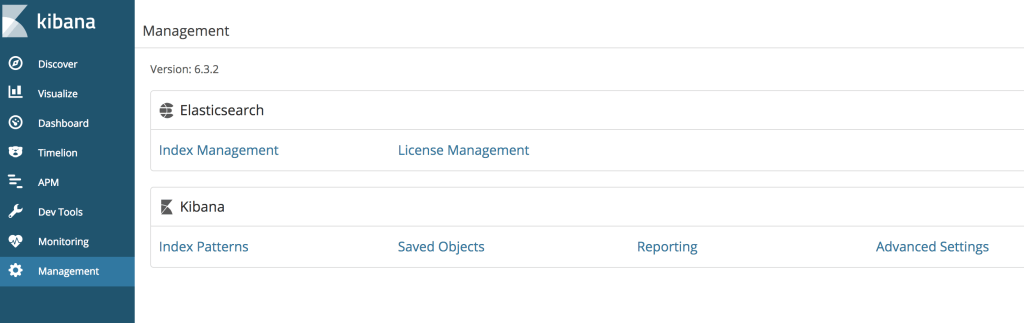
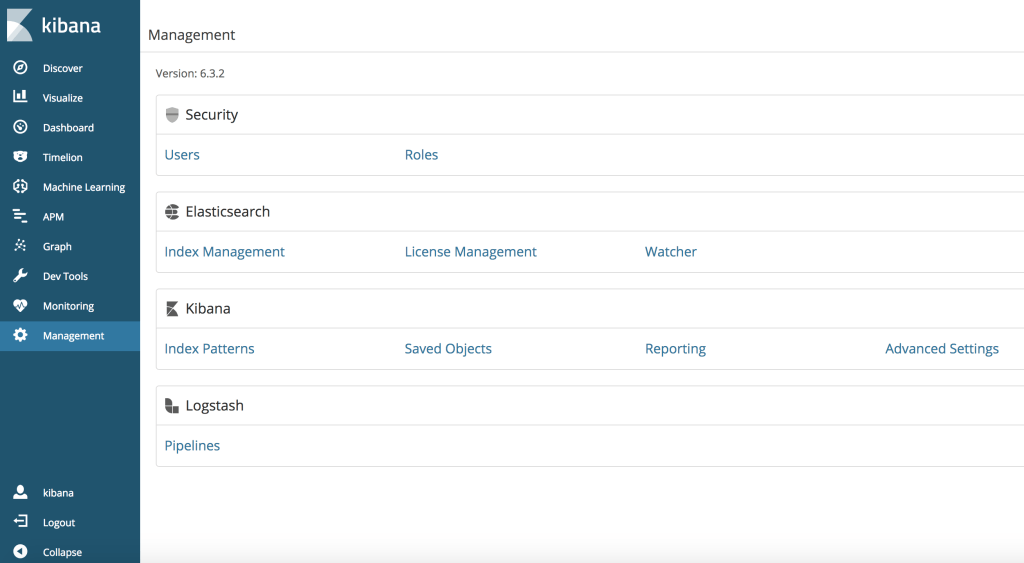
    3.Visit kibana, http://localhost:5601, you will see the dashboard, next we will enable 30-day-trail license.

    3.1.Click Management on left menu

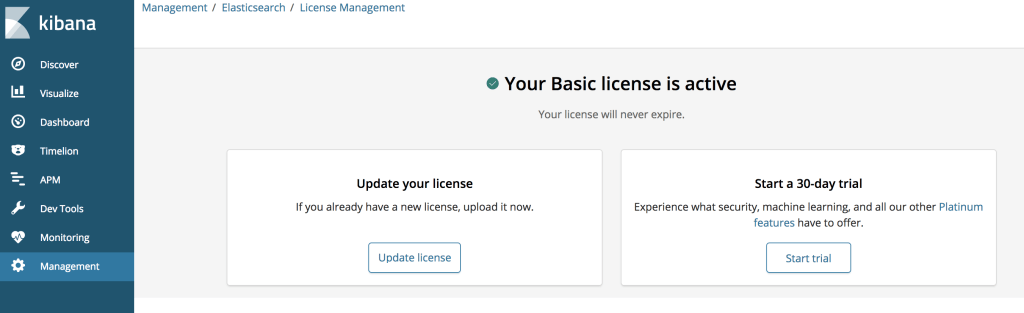
    3.2.Click License Management

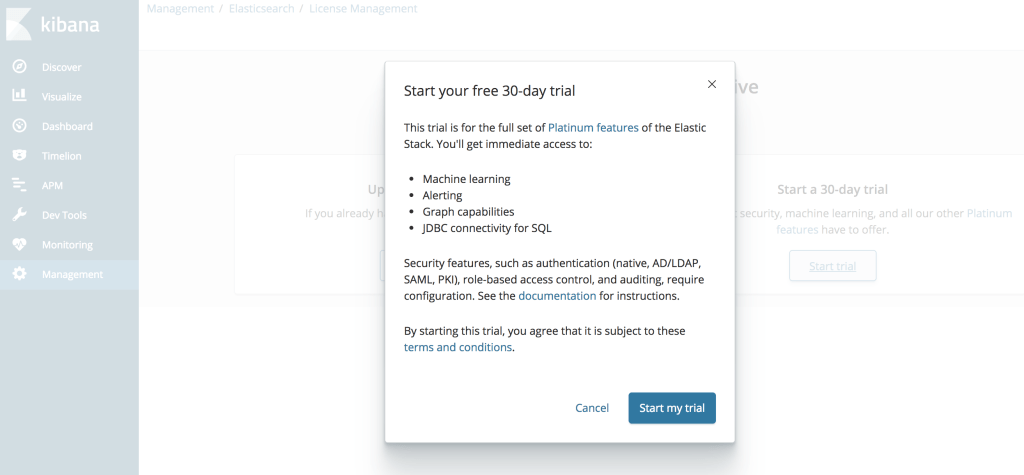
    3.3.Click Start trial button

    3.4.Click Start my trial button

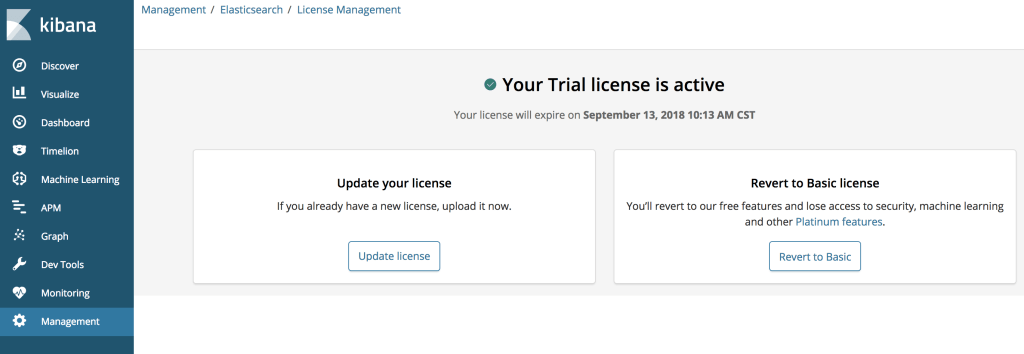
    3.5.Start trail license done


    X-Pack

    1.Enter elasticsearch directory, execute command as below to generate password for users, please choose one

    bin/elasticsearch-setup-passwords interactive(you need to enter password for every user)
    bin/elasticsearch-setup-passwords auto(will generate password for users automatically)
    

    2.Enter kibana directory, stop kibana and set username/password in kibana.yml, then start kibana

    echo "elasticsearch.username: kibana" >>config/kibana.yml
    echo "elasticsearch.password: kibana123" >>config/kibana.yml
    
    bin/kibana
    

    3.After finishing all the settings, you will see the login page

    4.Enter the username/password which you set in kibana.yml, then you could login success

     
  • Unknown's avatar

    Wang 19:45 on 2018-06-22 Permalink | Reply
    Tags: , , , Scala,   

    [Gatling] Customize your scripts based on scenario 

    Sometimes record function may not fulfill your requirement, in this case you need write scala script yourself according to gatling document.

    Below is a simple sample to test two APIs: employee & health check

    package me.hongmeng.stress.test
    
    import io.gatling.core.Predef._
    import io.gatling.http.Predef._
    
    class SimpleSimulation extends Simulation {
    
      val hostname = "http://localhost:8080"
    
      val httpProtocol = http
        .baseURL(hostname)
        .inferHtmlResources()
        .acceptHeader("*/*")
        .contentTypeHeader("application/json")
        .userAgentHeader("Gatling/2.3.1")
    
      val headers = Map("accept-encoding" -> "gzip, deflate", "cache-control" -> "no-cache")
    
      val employeeScenario = scenario("create_experiment_simulation")
        .exec(
          http("employee")
            .post("/v1/employees")
            .headers(headers)
            .body(
              StringBody("{"name": "xiaowang","major": "software"}")
            )
        )
    
      val healthScenario = scenario("health_simulation")
        .exec(
          http("health_check")
            .get("/actuator/health")
            .headers(headers)
        )
    
      setUp(
          employeeScenario.inject(atOnceUsers(10)),
          healthScenario.inject(atOnceUsers(10))
        ).protocols(httpProtocol)
    }
    
     
  • Unknown's avatar

    Wang 21:21 on 2018-06-13 Permalink | Reply
    Tags: , , ,   

    [Gatling] Know about stress test tool 

    Gatling is kind of stress test tool to test your app’s performance, for detail infos, please refer to official document.

    Next I will summurize how to install gatling on your Macbook.

    1.Download gatling

    wget https://repo1.maven.org/maven2/io/gatling/highcharts/gatling-charts-highcharts-bundle/2.3.1/gatling-charts-highcharts-bundle-2.3.1-bundle.zip
    

    2.Unzip & Enter

    unzip gatling-charts-highcharts-bundle-2.3.1-bundle.zip & cd gatling-charts-highcharts-bundle-2.3.1-bundle
    

    3.Start record function

    bin/record.sh
    

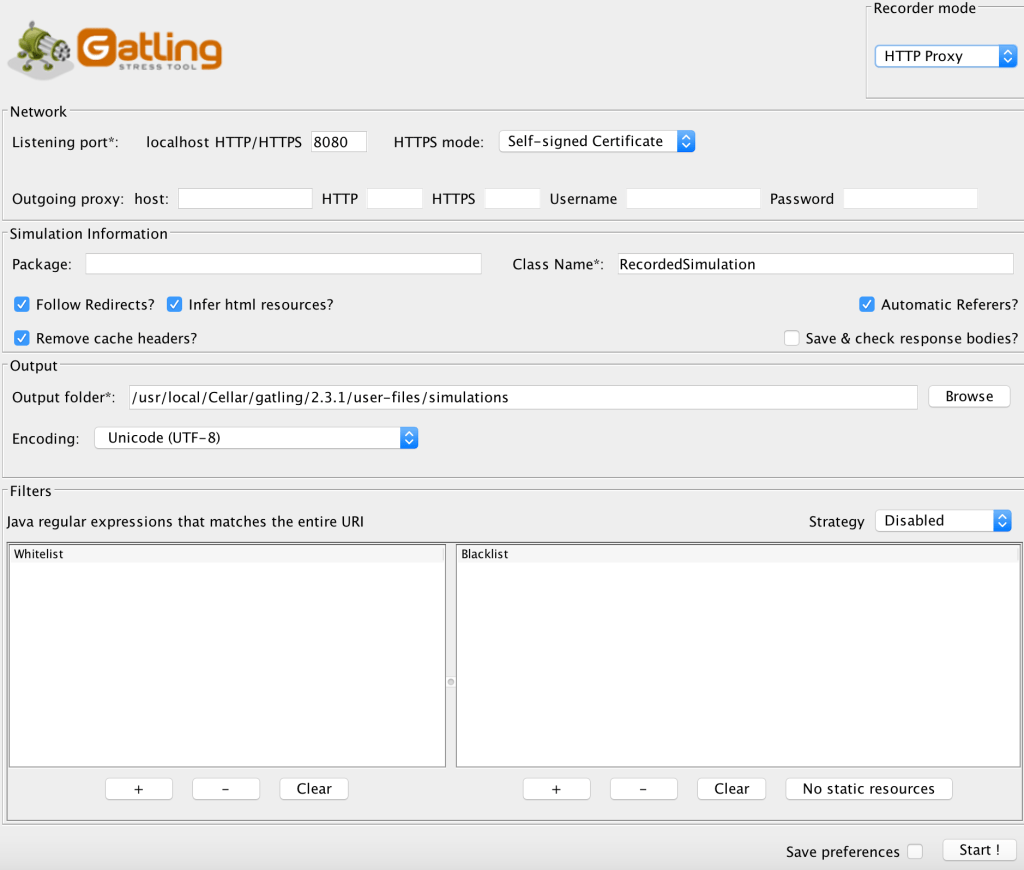
    After starting record script, you could see the UI as below:

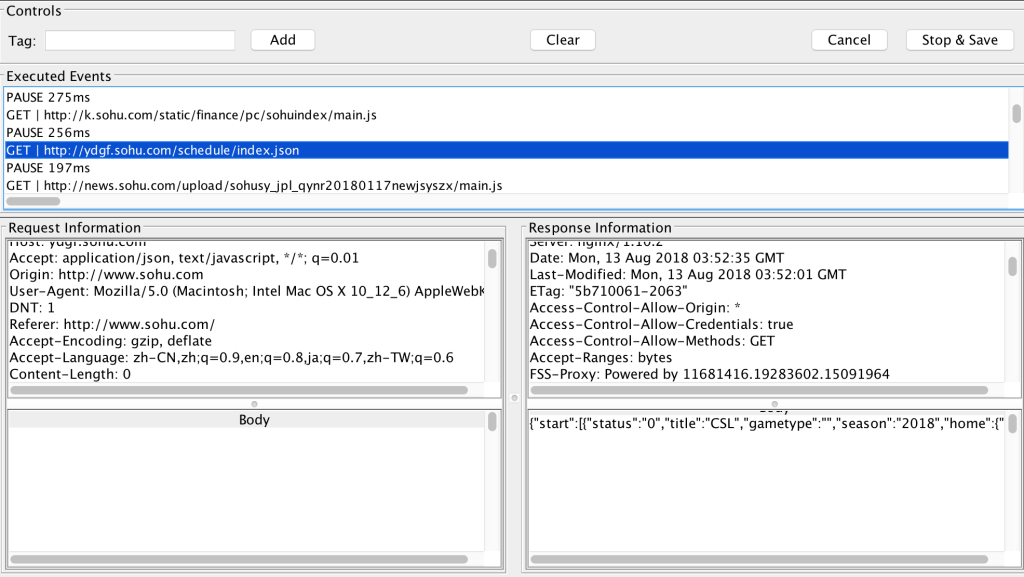
    Please configure the proxy port and click Start button. Then you could set your browser proxy and surf the target URL, gatling will capture the content as below:

    If you finished and wanna save the result, please click Stop & Save button, gatling will generate a new scala script which save all your behaviors just now, and the script will be under user-files/simulations/

    xxx@xxx 2.3.1 $ ll user-files/simulations/
    total 328
    drwxr-xr-x@ 4 1154257814  80     136 Aug 13 11:30 .
    drwxr-xr-x@ 5 1154257814  80     170 Mar  6 22:59 ..
    -rw-r--r--  1 1154257814  80  166657 Aug 13 11:54 RecordedSimulation.scala
    drwxr-xr-x@ 4 1154257814  80     136 Mar  6 22:59 computerdatabase
    

    If you wanna change the generated file location, please modify outputFolder in conf/recorder.conf

    hongmeng.wang@X0621 2.3.1 $ cat conf/recorder.conf 
    recorder {
        core {
            className=RecordedSimulation
            encoding=utf-8
            harFilePath=""
            headless=false
            mode=Proxy
            outputFolder="/usr/local/Cellar/gatling/2.3.1/user-files/simulations"
            package=""
            ...
            ...
    
     
  • Unknown's avatar

    Wang 17:52 on 2018-05-19 Permalink | Reply
    Tags:   

    New domain!! hongmeng.me

     
c
Compose new post
j
Next post/Next comment
k
Previous post/Previous comment
r
Reply
e
Edit
o
Show/Hide comments
t
Go to top
l
Go to login
h
Show/Hide help
shift + esc
Cancel