Tagged: API Toggle Comment Threads | Keyboard Shortcuts

  • Unknown's avatar

    Wang 19:25 on 2018-08-11 Permalink | Reply
    Tags: API, , , , ,   

    Auto scaling in kubernetes 

    When we deploy a API in kubernets we must define replication number for the pod, but as we know there will be high traffic during peak time and we usually can’t estimate service capacity exactly at first time, in this case we must scale our service like creating more pods to share online traffic to avoid service crash down.

    We usually scale service manually before using kubernetes, append more nodes during peak time and destroy nodes when the traffic became smooth.

    In kubernetes there’s a kind of feature called HPA(Horizontal Pod Autoscaler) which could help your scale service automatically. You could specify minimum and maximum replica number in yaml file, HPA will monitor pod’s CPU and Memory by collecting pod’s metric, if HPA found your pod’s metric is over the threshold number which you defined in yaml file, it will create more pods automatically and join the service cluster to load the traffic.

    Here is a simple HPA samle:

    apiVersion: autoscaling/v2beta1
    kind: HorizontalPodAutoscaler
    metadata:
      name: hpa-demo
      namespace: test-ns
      labels:
        app: hpa-demo
        component: api
    spec:
      scaleTargetRef:
        apiVersion: apps/v1
        kind: Deployment
        name: hpa-demo
      minReplicas: 3
      maxReplicas: 10
      metrics:
      - type: Resource
        resource:
          name: memory
          targetAverageUtilization: 75
      - type: Resource
        resource:
          name: cpu
          targetAverageUtilization: 75
    

    I defined there’s will be at least 3 replicas for the pod, if the CPU or Memory usage is over 75%, HPA will create at most 10 pods.

    HPA monitor pod’s metric by using metrics-server.

     
  • Unknown's avatar

    Wang 20:16 on 2018-07-04 Permalink | Reply
    Tags: API,   

    [Gatling] API test report 

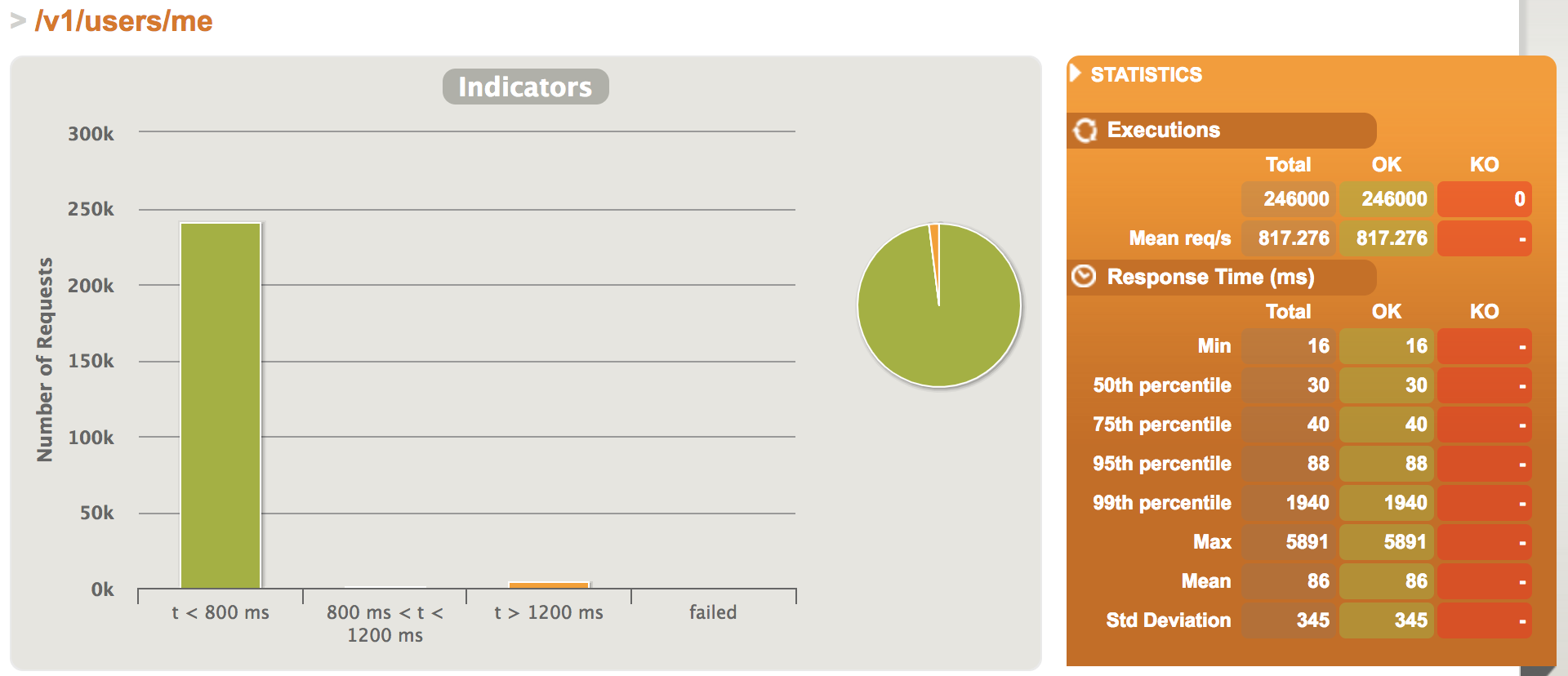
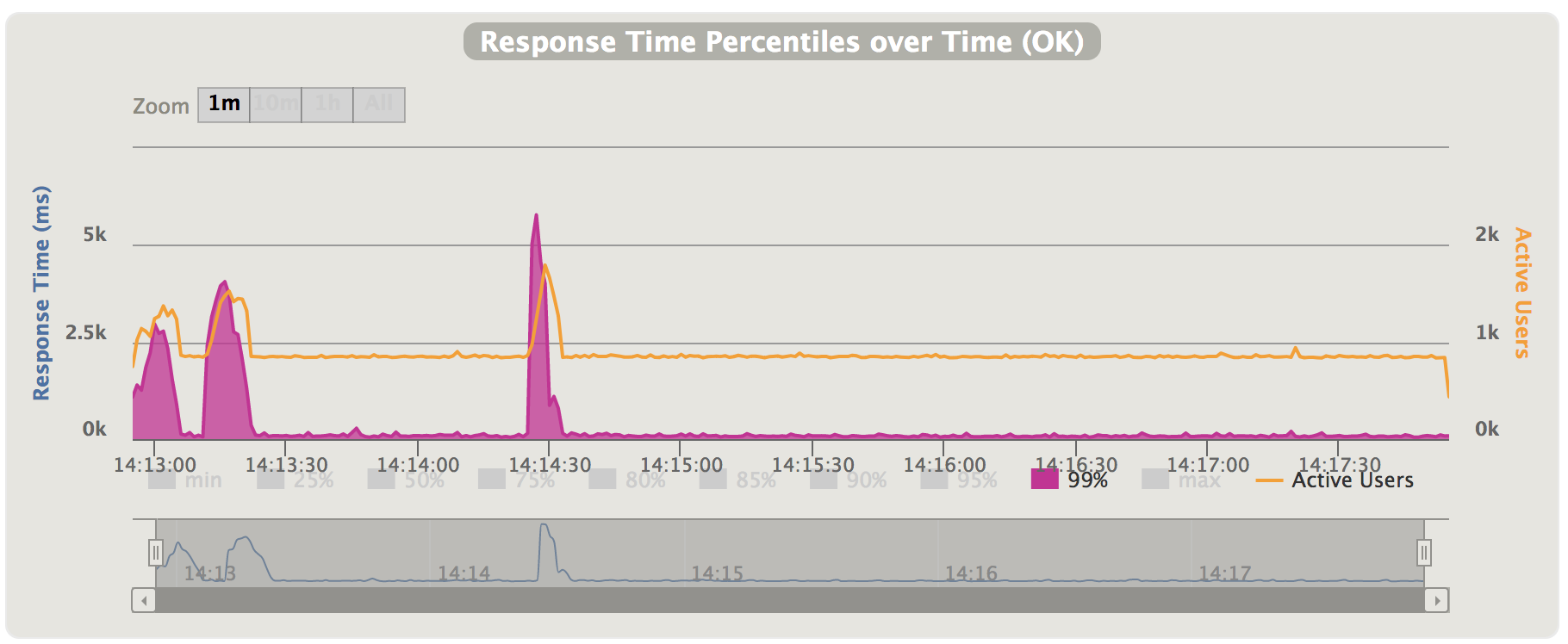
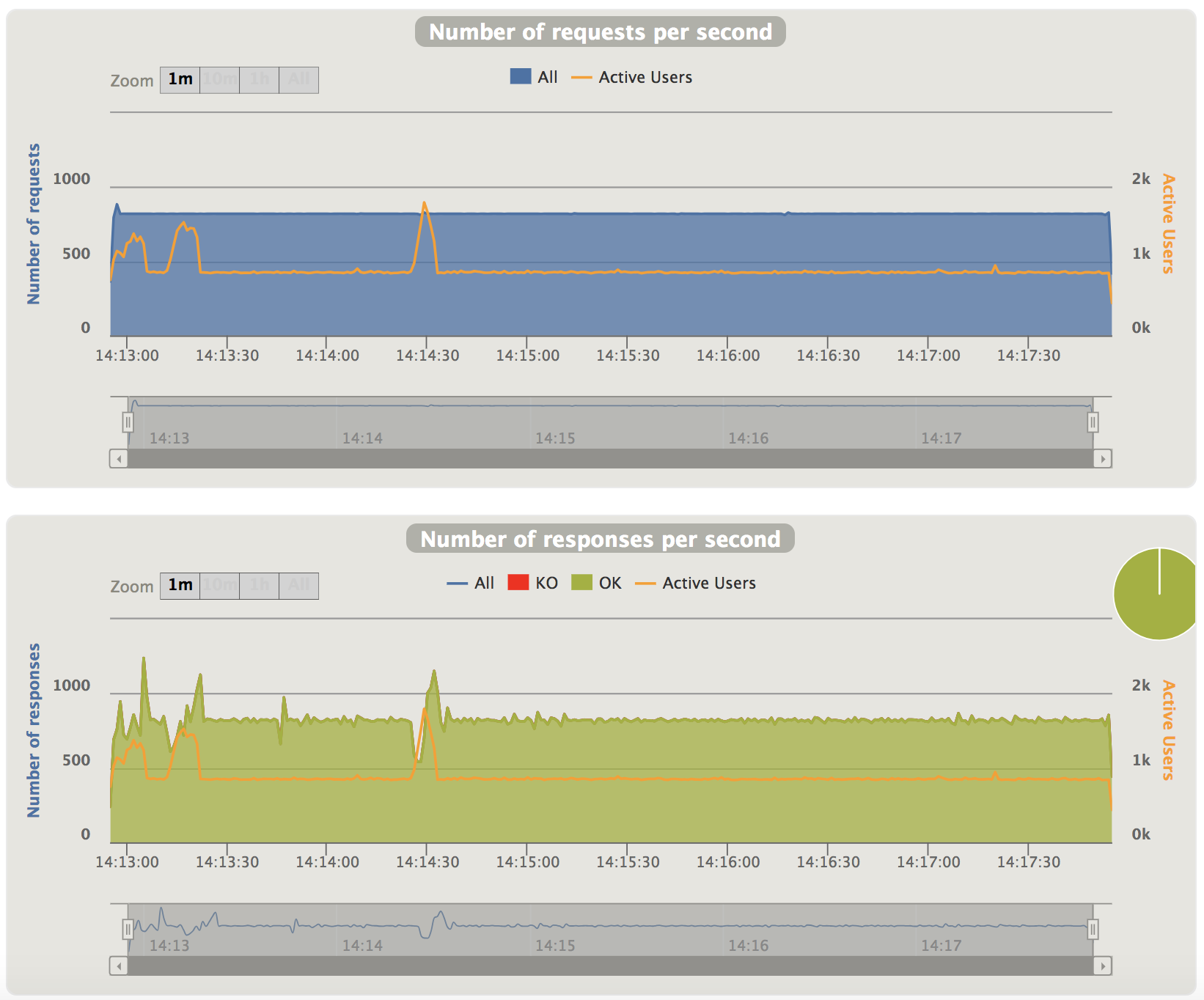
    Recent I did performance test on user API, I simulated sending 246K requests during 300 seconds.

    1.Test Report

    ================================================================================
    ---- Global Information --------------------------------------------------------
    > request count                                     246000 (OK=246000 KO=0     )
    > min response time                                     16 (OK=16     KO=-     )
    > max response time                                   5891 (OK=5891   KO=-     )
    > mean response time                                    86 (OK=86     KO=-     )
    > std deviation                                        345 (OK=345    KO=-     )
    > response time 50th percentile                         30 (OK=30     KO=-     )
    > response time 75th percentile                         40 (OK=40     KO=-     )
    > response time 95th percentile                         88 (OK=88     KO=-     )
    > response time 99th percentile                       1940 (OK=1940   KO=-     )
    > mean requests/sec                                817.276 (OK=817.276 KO=-     )
    ---- Response Time Distribution ------------------------------------------------
    > t < 800 ms                                        240565 ( 98%)
    > 800 ms < t < 1200 ms                                1110 (  0%)
    > t > 1200 ms                                         4325 (  2%)
    > failed                                                 0 (  0%)
    ================================================================================


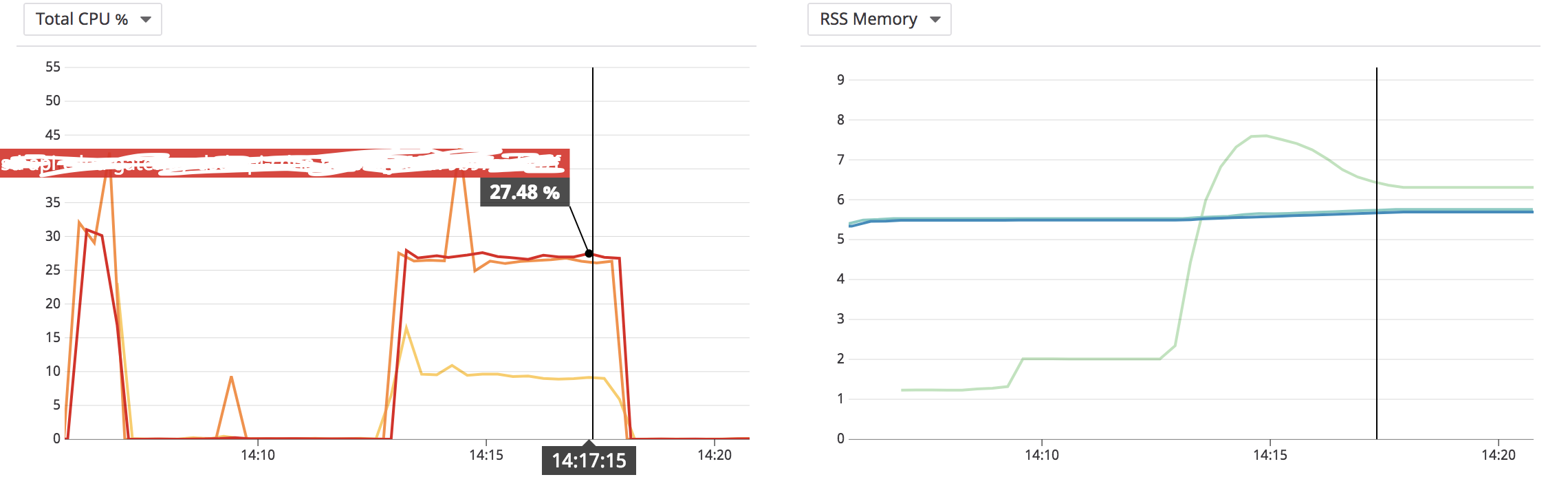
    2.Server Status

    I did the test on server which the network latency is quite low, if I did the test from external environment, I think the QPS will decrease several times.

     
  • Unknown's avatar

    Wang 19:45 on 2018-06-22 Permalink | Reply
    Tags: API, , , Scala,   

    [Gatling] Customize your scripts based on scenario 

    Sometimes record function may not fulfill your requirement, in this case you need write scala script yourself according to gatling document.

    Below is a simple sample to test two APIs: employee & health check

    package me.hongmeng.stress.test
    
    import io.gatling.core.Predef._
    import io.gatling.http.Predef._
    
    class SimpleSimulation extends Simulation {
    
      val hostname = "http://localhost:8080"
    
      val httpProtocol = http
        .baseURL(hostname)
        .inferHtmlResources()
        .acceptHeader("*/*")
        .contentTypeHeader("application/json")
        .userAgentHeader("Gatling/2.3.1")
    
      val headers = Map("accept-encoding" -> "gzip, deflate", "cache-control" -> "no-cache")
    
      val employeeScenario = scenario("create_experiment_simulation")
        .exec(
          http("employee")
            .post("/v1/employees")
            .headers(headers)
            .body(
              StringBody("{"name": "xiaowang","major": "software"}")
            )
        )
    
      val healthScenario = scenario("health_simulation")
        .exec(
          http("health_check")
            .get("/actuator/health")
            .headers(headers)
        )
    
      setUp(
          employeeScenario.inject(atOnceUsers(10)),
          healthScenario.inject(atOnceUsers(10))
        ).protocols(httpProtocol)
    }
    
     
  • Unknown's avatar

    Wang 21:21 on 2018-06-13 Permalink | Reply
    Tags: API, , ,   

    [Gatling] Know about stress test tool 

    Gatling is kind of stress test tool to test your app’s performance, for detail infos, please refer to official document.

    Next I will summurize how to install gatling on your Macbook.

    1.Download gatling

    wget https://repo1.maven.org/maven2/io/gatling/highcharts/gatling-charts-highcharts-bundle/2.3.1/gatling-charts-highcharts-bundle-2.3.1-bundle.zip
    

    2.Unzip & Enter

    unzip gatling-charts-highcharts-bundle-2.3.1-bundle.zip & cd gatling-charts-highcharts-bundle-2.3.1-bundle
    

    3.Start record function

    bin/record.sh
    

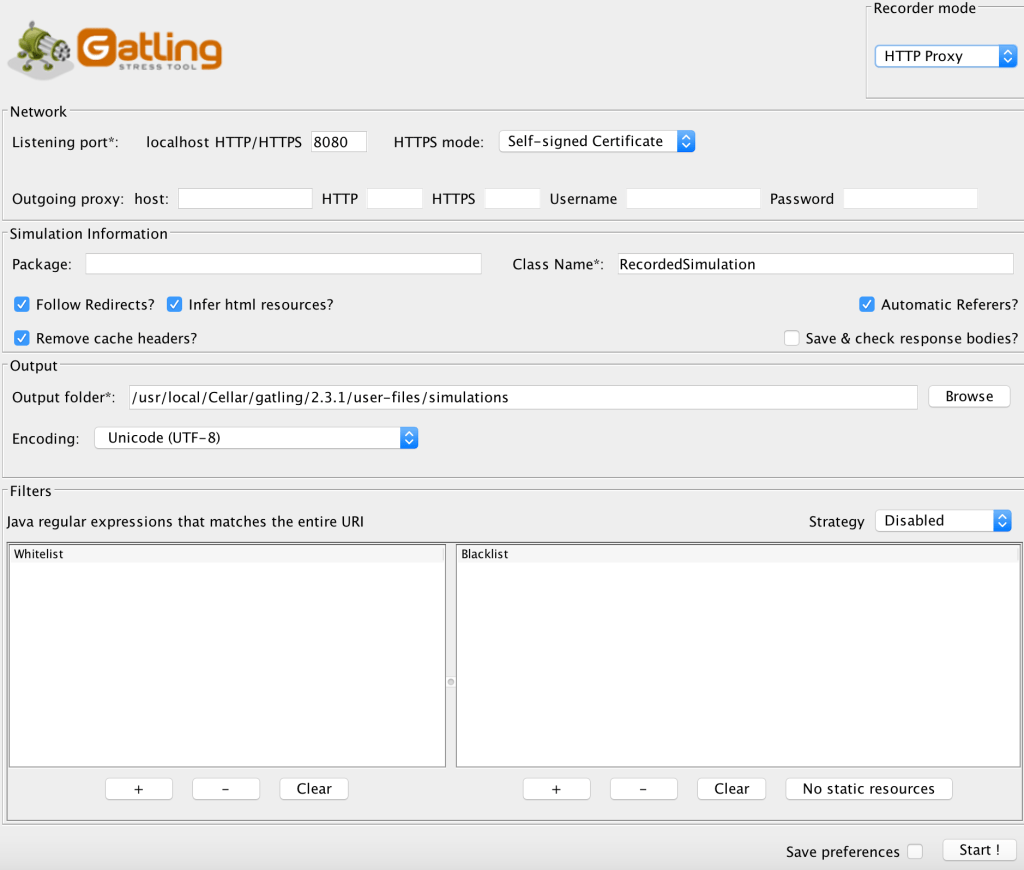
    After starting record script, you could see the UI as below:

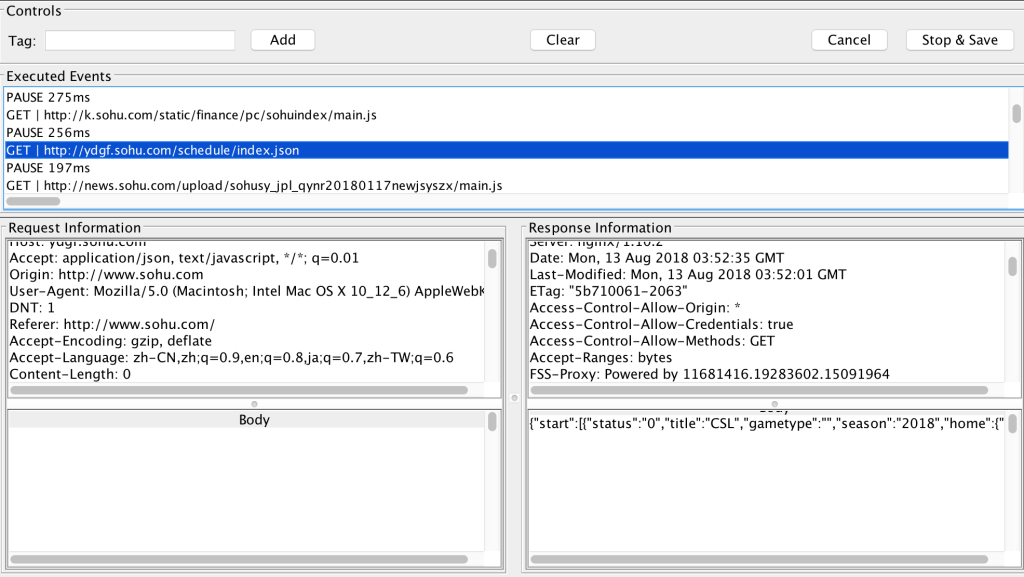
    Please configure the proxy port and click Start button. Then you could set your browser proxy and surf the target URL, gatling will capture the content as below:

    If you finished and wanna save the result, please click Stop & Save button, gatling will generate a new scala script which save all your behaviors just now, and the script will be under user-files/simulations/

    xxx@xxx 2.3.1 $ ll user-files/simulations/
    total 328
    drwxr-xr-x@ 4 1154257814  80     136 Aug 13 11:30 .
    drwxr-xr-x@ 5 1154257814  80     170 Mar  6 22:59 ..
    -rw-r--r--  1 1154257814  80  166657 Aug 13 11:54 RecordedSimulation.scala
    drwxr-xr-x@ 4 1154257814  80     136 Mar  6 22:59 computerdatabase
    

    If you wanna change the generated file location, please modify outputFolder in conf/recorder.conf

    hongmeng.wang@X0621 2.3.1 $ cat conf/recorder.conf 
    recorder {
        core {
            className=RecordedSimulation
            encoding=utf-8
            harFilePath=""
            headless=false
            mode=Proxy
            outputFolder="/usr/local/Cellar/gatling/2.3.1/user-files/simulations"
            package=""
            ...
            ...
    
     
  • Unknown's avatar

    Wang 21:56 on 2018-04-29 Permalink | Reply
    Tags: API, ,   

    [Spring Boot2] Define your configuration properties 

    When we develop spring boot application, I think it’s very helpful that IDE gives popup suggestion when we configure application.yml, but if we define our own properties, IDE will not support this, even give us tips like “Cannot resolve configuration property “spring.application.log-path“.

    So I checked spring document, and found ways to solve this.

    1.Add spring dependency in your pom.xml

    <dependency>
        <groupId>org.springframework.boot</groupId>
        <artifactId>spring-boot-configuration-processor</artifactId>
    </dependency>
    

    2.Define your configuration class

    @ConfigurationProperties(prefix = "spring.application")
    @Data
    public class ApiPropertyConfiguration {
        private String timezone;
        private String logPath;
    }
    

    Then try to type your properties in application.yml, I think you will get popup suggestions.

     
  • Unknown's avatar

    Wang 22:16 on 2018-04-22 Permalink | Reply
    Tags: API, , ,   

    [Spring Boot2] Access log trace 

    If I wanna trace access logs, I usually configured in nginx and tomcat, only print business logs in java api.

    In this case you need check both nginx logs and api logs in monitor tools like kinaba, it’s a little bit inconvenience, so I wanna also add request access logs in api side.

    Generally we can create a new interceptor which extends OncePerRequestFilter, it will intercept all the requests and you can define your own logic inside. But it maybe a little complex in POST request, if you intercept and handle POST request body, when the request arrived controller, the request body will be null, because you have read the stream in your interceptor, so you have to create another request wrapper which extends HttpServletRequestWrapper, then pass the request wrapper to the filter chain.

    Actually we can make it in more easily way according to spring boot’s component:  spring-boot-starter-actuator. actuator component contains lots of useful endpoints like health check/shutdown hook/metrics and so on. There are also a class named HttpTraceRepository, which will record recent access logs. Specific documentation please go to Spring Boot Actuator.

    I extended HttpTraceRepository and combined with Aspectj, which will print both request and parameters to log, and extract it into framework module, any project could include it very easily.

    Printed logs as below:

    2018-05-03 06:56:10,651 - [http-nio-8080-exec-6] - [INFO ] - [xxx.xxx.xxx.api.framework.aop.LogHttpTraceRepository.around(line:47)] - RequestParam:[1,null,null], ResponseEntity:{"timestamp":1525330570651,"status":200,"error":null,"exception":null,"message":"success","path":null,"method":null,"data":{"experimentId":1,"results":[]}}
    2018-05-03 06:56:10,654 - [http-nio-8080-exec-6] - [INFO ] - [xxx.xxx.xxx.api.framework.aop.LogHttpTraceRepository.add(line:32)] - GET http://localhost:8080/v1/employees?deparment_id=1 - 200 - 15ms
    2018-05-03 06:56:10,655 - [http-nio-8080-exec-6] - [INFO ] - [xxx.xxx.xxx.api.framework.aop.LogHttpTraceRepository.add(line:34)] - RequestHeader:{host=[localhost:8080], connection=[keep-alive], cache-control=[no-cache], user-agent=[Mozilla/5.0 (Macintosh; Intel Mac OS X 10_13_1) AppleWebKit/537.36 (KHTML, like Gecko) Chrome/66.0.3359.139 Safari/537.36], postman-token=[e9a16988-64a6-1363-bdbd-6b63fe40da5c], accept=[*/*], dnt=[1], accept-encoding=[gzip, deflate, br], accept-language=[zh-CN,zh;q=0.9,en;q=0.8,ja;q=0.7,zh-TW;q=0.6]}, ResponseHeader:{Content-Type=[application/json;charset=UTF-8], Transfer-Encoding=[chunked], Content-Encoding=[gzip], Vary=[Accept-Encoding], Date=[Thu, 03 May 2018 06:56:10 GMT]}


    LogHttpTraceRepository:

    @Aspect
    @Component
    @Slf4j
    public class LogHttpTraceRepository implements HttpTraceRepository {
    
        @Override
        public List<HttpTrace> findAll() {
            return Collections.emptyList();
        }
    
        @Override
        public void add(HttpTrace trace) {
            HttpTrace.Request request = trace.getRequest();
            HttpTrace.Response response = trace.getResponse();
            long timeToken = trace.getTimeTaken();
    
            log.info("{} {} - {} - {}ms", request.getMethod(), request.getUri(),
                    response.getStatus(), timeToken);
            log.info("RequestHeader:{}, ResponseHeader:{}", request.getHeaders(), response.getHeaders());
        }
    
        @Around("execution(* com.xxx..controller.*.*(..))")
        Object around(ProceedingJoinPoint proceedingJoinPoint) throws Throwable {
            StringBuilder logBuilder = new StringBuilder();
            Optional<String> requestOptional = JsonUtils.toJson(proceedingJoinPoint.getArgs());
            requestOptional.ifPresent(request -> logBuilder.append("RequestParam:").append(request).append(", "));
    
            Object response = proceedingJoinPoint.proceed();
            Optional<String> responseOptional = JsonUtils.toJson(response);
            responseOptional.ifPresent(res -> logBuilder.append("ResponseEntity:").append(res));
    
            log.info(logBuilder.toString());
            return response;
        }
    }


  • Unknown's avatar

    Wang 21:34 on 2018-04-20 Permalink | Reply
    Tags: API, , ,   

    [Spring Boot2] Common exception handler 

    When we develop API, how to handle exception is very important for us to locate error, find out exact error code.

    Recently I extracted exceptionHandler to a common framework, and deploy it into our internal maven repository. If anyone wanna use it, just add maven dependency, and it will works automatically.

    1.Add internal repository and dependency in your pom.xml

    <repositories>
        <repository>
            <id>nexus-central</id>
            <url>https://nexus.tool.xxx.internal/repository/maven-public/</url>
            <releases>
                <enabled>true</enabled>
                <updatePolicy>always</updatePolicy>
            </releases>
            <snapshots>
                <enabled>true</enabled>
                <updatePolicy>always</updatePolicy>
            </snapshots>
        </repository>
    </repositories>
    
    <dependency>
        <groupId>com.xxx</groupId>
        <artifactId>xxx-framework-web</artifactId>
        <version>1.0.0-SNAPSHOT</version>
    </dependency>
    

    2.Add package scan annotation, the package prefix must be the same as framework’s package

    @ComponentScan(basePackages = "com.xxx.xxx.api")
    

    Then it will intercept all the exception and print error logs and respond to the client.

    Error Logs:

    2018-04-19 07:02:24,785 - [http-nio-8080-exec-2] - [ERROR] - [xxx.xxx.xxx.api.framework.aop.ApiExceptionHandler.internalErrorHandler(line:26)] - org.springframework.jdbc.BadSqlGrammarException: 
    ### SQL: SELECT id, experiment_id, start_at, model, created_at, created_by, updated_at, updated_by FROM XXX WHERE experiment_id = ?
    ### Cause: com.mysql.jdbc.exceptions.jdbc4.MySQLSyntaxErrorException: Table 'xxx_xxx.XXX' doesn't exist
    ; bad SQL grammar []; nested exception is com.mysql.jdbc.exceptions.jdbc4.MySQLSyntaxErrorException: Table 'xxx_xxx.XXX' doesn't exist
        at org.springframework.jdbc.support.SQLErrorCodeSQLExceptionTranslator.doTranslate(SQLErrorCodeSQLExceptionTranslator.java:235)
        at org.springframework.jdbc.support.AbstractFallbackSQLExceptionTranslator.translate(AbstractFallbackSQLExceptionTranslator.java:72)
        at org.mybatis.spring.MyBatisExceptionTranslator.translateExceptionIfPossible(MyBatisExceptionTranslator.java:73)
        ...
        ...
        at java.util.concurrent.ThreadPoolExecutor.runWorker(ThreadPoolExecutor.java:1142)
        at java.util.concurrent.ThreadPoolExecutor$Worker.run(ThreadPoolExecutor.java:617)
        at org.apache.tomcat.util.threads.TaskThread$WrappingRunnable.run(TaskThread.java:61)
        at java.lang.Thread.run(Thread.java:745)
    Caused by: com.mysql.jdbc.exceptions.jdbc4.MySQLSyntaxErrorException: Table 'xxx_xxx.XXX' doesn't exist
        at sun.reflect.NativeConstructorAccessorImpl.newInstance0(Native Method)
        at sun.reflect.NativeConstructorAccessorImpl.newInstance(NativeConstructorAccessorImpl.java:62)
        at sun.reflect.DelegatingConstructorAccessorImpl.newInstance(DelegatingConstructorAccessorImpl.java:45)
        at java.lang.reflect.Constructor.newInstance(Constructor.java:423)
        ...
        ...
        at sun.reflect.DelegatingMethodAccessorImpl.invoke(DelegatingMethodAccessorImpl.java:43)
        at java.lang.reflect.Method.invoke(Method.java:498)
        at org.mybatis.spring.SqlSessionTemplate$SqlSessionInterceptor.invoke(SqlSessionTemplate.java:433)
        ... 95 more
    

    Client Response:

    {
        "timestamp": "2018-05-03T07:02:24Z",
        "status": 500,
        "error": "Internal Server Error",
        "message": "n### Error querying database.  Cause: com.mysql.jdbc.exceptions.jdbc4.MySQLSyntaxErrorException: Table 'xxx_xxx.xxx' doesn't existn### The error may exist in file [/Users/xxx/java/xxx-api-xxx/target/classes/com/xxx/xxx/api/xxx/mapper/xxxMapper.xml]n### The error may involve defaultParameterMapn### The error occurred while setting parametersn### SQL: SELECT id, department_id, start_at, created_at, created_by, updated_at, updated_by FROM xxx WHERE department_id = ?n### Cause: com.mysql.jdbc.exceptions.jdbc4.MySQLSyntaxErrorException: Table 'xxx_xxx.xxx' doesn't existn; bad SQL grammar []; nested exception is com.mysql.jdbc.exceptions.jdbc4.MySQLSyntaxErrorException: Table 'xxx_xxx.xxx' doesn't exist",
        "path": "/v1/employees",
        "method": "GET"
    }
    

    ApiExceptionHandler:

    @RestControllerAdvice
    @Slf4j
    public class ApiExceptionHandler extends ResponseEntityExceptionHandler {
    
        @ExceptionHandler(RuntimeException.class)
        @ResponseStatus(code = HttpStatus.INTERNAL_SERVER_ERROR)
        public ApiResponseEntity internalErrorHandler(Exception exception, ServletWebRequest request) {
            log.error("{}", ExceptionUtils.getStackTrace(exception));
            return new ApiResponseEntity(HttpStatus.INTERNAL_SERVER_ERROR.value(), HttpStatus.INTERNAL_SERVER_ERROR.getReasonPhrase(),
                    exception.getMessage(), request);
        }
    
        @ExceptionHandler(ResourceNotFoundException.class)
        @ResponseStatus(code = HttpStatus.NOT_FOUND)
        public ApiResponseEntity notFoundHandler(Exception exception, ServletWebRequest request) {
            log.warn("{}", exception.getMessage());
            return new ApiResponseEntity(HttpStatus.NOT_FOUND.value(), HttpStatus.NOT_FOUND.getReasonPhrase(),
                    exception.getMessage(), request);
        }
    
        @ExceptionHandler(IllegalArgumentException.class)
        @ResponseStatus(code = HttpStatus.BAD_REQUEST)
        public ApiResponseEntity illegalArgumentException(Exception exception, ServletWebRequest request) {
            log.warn("{}", exception.getMessage());
            return new ApiResponseEntity(HttpStatus.BAD_REQUEST.value(), HttpStatus.BAD_REQUEST.getReasonPhrase(),
                    exception.getMessage(), request);
        }
    
        @Override
        protected ResponseEntity<Object> handleExceptionInternal(
                Exception exception, @Nullable Object body, HttpHeaders headers, HttpStatus status, WebRequest request) {
            log.warn("{}", exception.getMessage());
    
            if (HttpStatus.INTERNAL_SERVER_ERROR.equals(status)) {
                request.setAttribute(WebUtils.ERROR_EXCEPTION_ATTRIBUTE, exception, WebRequest.SCOPE_REQUEST);
            }
    
            ServletWebRequest servletWebRequest = (ServletWebRequest) request;
            ApiResponseEntity apiResponseEntity = new ApiResponseEntity(status.value(), status.getReasonPhrase(), exception.getMessage(), servletWebRequest);
            return new ResponseEntity<>(apiResponseEntity, headers, status);
        }
    }
    
     
  • Unknown's avatar

    Wang 22:32 on 2018-03-28 Permalink | Reply
    Tags: API, , , ,   

    [Spring Boot2] Demo 

    Recently Spring Boot has released version 2.0.0.RELEASE, so I did a small demo which included the basic CRUD, I have uploaded the code to github.

    There are two branches, master is the normal branch, and docker branch will create docker image when you build.

     
c
Compose new post
j
Next post/Next comment
k
Previous post/Previous comment
r
Reply
e
Edit
o
Show/Hide comments
t
Go to top
l
Go to login
h
Show/Hide help
shift + esc
Cancel