NVIDIA DGX
https://www.nvidia.com/en-us/data-center/dgx-systems/





In this light, here is a comparison of Open Source NOSQL databases Cassandra, Mongodb, CouchDB, Redis, Riak, RethinkDB, Couchbase (ex-Membase), Hypertable, ElasticSearch, Accumulo, VoltDB, Kyoto Tycoon, Scalaris, OrientDB, Aerospike, Neo4j and HBase:
https://kkovacs.eu/cassandra-vs-mongodb-vs-couchdb-vs-redis/
As we have some business requirements about data aggregation and online processing, so we did a quick PoC on Apache Druid. Next I will show how to build druid quickly and start your ingestion task.
1.Select release version which is compatible to your existing system and download the package.
2.Choose what kind of druid service you want to start with
Then you start druid service in every node by execute start-cluster script.
3.Visit druid through browser, http://IP:8888
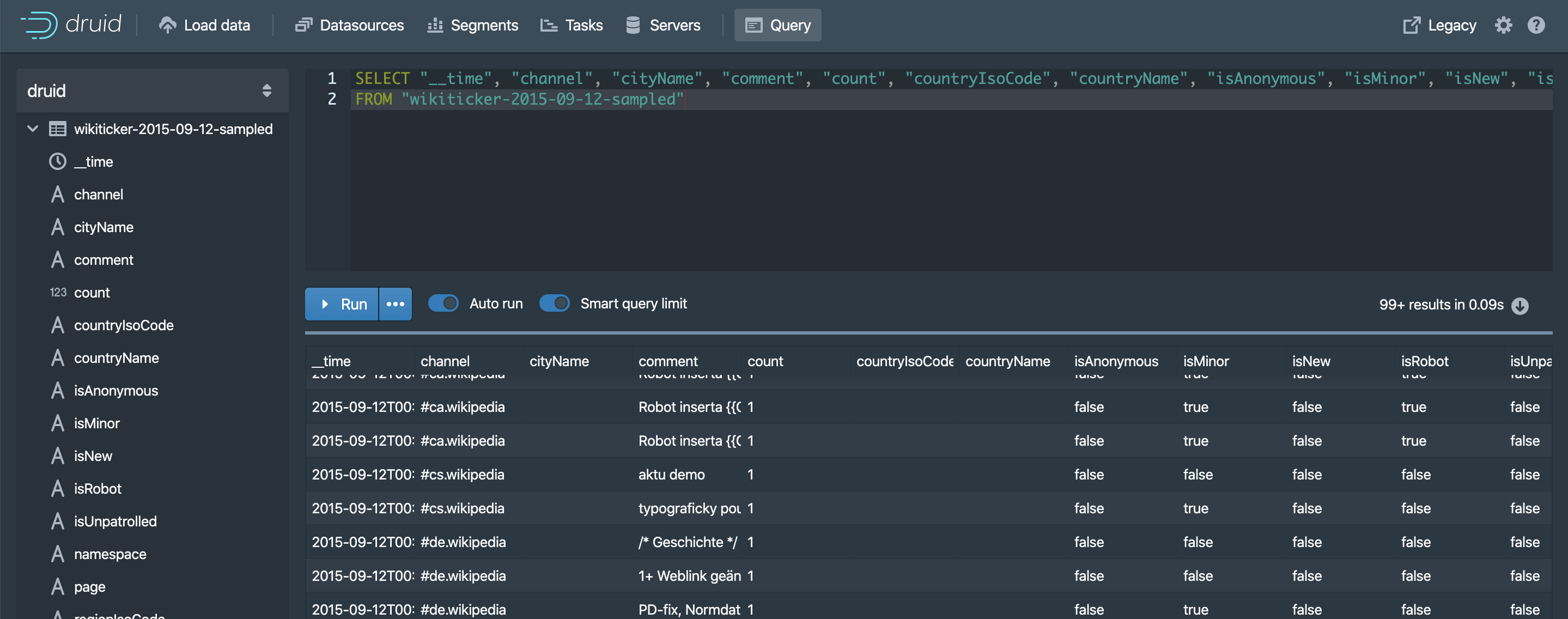
Next I load the data from local file and can ingest the data file as a datasource, and finally query data by SQL.
Task configuration
{
  "type": "index_parallel",
  "id": "index_parallel_wikiticker-2015-09-12-sampled_2020-02-18T11:17:29.236Z",
  "resource": {
    "availabilityGroup": "index_parallel_wikiticker-2015-09-12-sampled_2020-02-18T11:17:29.236Z",
    "requiredCapacity": 1
  },
  "spec": {
    "dataSchema": {
      "dataSource": "wikiticker-2015-09-12-sampled",
      "parser": {
        "type": "string",
        "parseSpec": {
          "format": "json",
          "timestampSpec": {
            "column": "time",
            "format": "iso"
          },
          "dimensionsSpec": {
            "dimensions": [
              "channel",
              "cityName",
              "comment",
              "countryIsoCode",
              "countryName",
              "isAnonymous",
              "isMinor",
              "isNew",
              "isRobot",
              "isUnpatrolled",
              "namespace",
              "page",
              "regionIsoCode",
              "regionName",
              "user"
            ]
          }
        }
      },
      "metricsSpec": [
        {
          "type": "count",
          "name": "count"
        },
        {
          "type": "longSum",
          "name": "sum_added",
          "fieldName": "added",
          "expression": null
        },
        {
          "type": "longSum",
          "name": "sum_deleted",
          "fieldName": "deleted",
          "expression": null
        },
        {
          "type": "longSum",
          "name": "sum_delta",
          "fieldName": "delta",
          "expression": null
        },
        {
          "type": "longSum",
          "name": "sum_metroCode",
          "fieldName": "metroCode",
          "expression": null
        }
      ],
      "granularitySpec": {
        "type": "uniform",
        "segmentGranularity": "DAY",
        "queryGranularity": "HOUR",
        "rollup": true,
        "intervals": null
      },
      "transformSpec": {
        "filter": null,
        "transforms": []
      }
    },
    "ioConfig": {
      "type": "index_parallel",
      "firehose": {
        "type": "local",
        "baseDir": "/opt/druid-0.16.0/quickstart/tutorial",
        "filter": "wikiticker-2015-09-12-sampled.json.gz",
        "parser": null
      },
      "appendToExisting": false
    },
    "tuningConfig": {
      "type": "index_parallel",
      "maxRowsPerSegment": null,
      "maxRowsInMemory": 1000000,
      "maxBytesInMemory": 0,
      "maxTotalRows": null,
      "numShards": null,
      "partitionsSpec": null,
      "indexSpec": {
        "bitmap": {
          "type": "concise"
        },
        "dimensionCompression": "lz4",
        "metricCompression": "lz4",
        "longEncoding": "longs"
      },
      "indexSpecForIntermediatePersists": {
        "bitmap": {
          "type": "concise"
        },
        "dimensionCompression": "lz4",
        "metricCompression": "lz4",
        "longEncoding": "longs"
      },
      "maxPendingPersists": 0,
      "forceGuaranteedRollup": false,
      "reportParseExceptions": false,
      "pushTimeout": 0,
      "segmentWriteOutMediumFactory": null,
      "maxNumConcurrentSubTasks": 1,
      "maxRetry": 3,
      "taskStatusCheckPeriodMs": 1000,
      "chatHandlerTimeout": "PT10S",
      "chatHandlerNumRetries": 5,
      "maxNumSegmentsToMerge": 100,
      "totalNumMergeTasks": 10,
      "logParseExceptions": false,
      "maxParseExceptions": 2147483647,
      "maxSavedParseExceptions": 0,
      "partitionDimensions": [],
      "buildV9Directly": true
    }
  },
  "context": {
    "forceTimeChunkLock": true
  },
  "groupId": "index_parallel_wikiticker-2015-09-12-sampled_2020-02-18T11:17:29.236Z",
  "dataSource": "wikiticker-2015-09-12-sampled"
}
Task running status
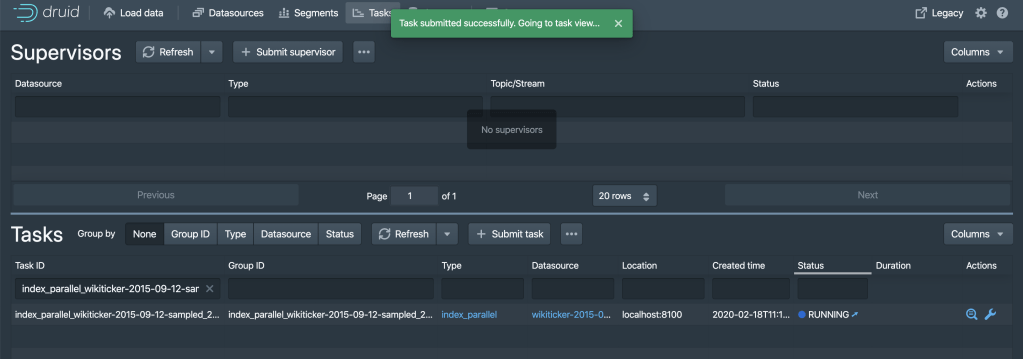
Task finished, you can see the item in datasource/segment/query




 Wang's Tech Blog
Reply