Tagged: Cluster Toggle Comment Threads | Keyboard Shortcuts

  • Unknown's avatar

    Wang 21:23 on 2018-09-06 Permalink | Reply
    Tags: , Cluster, , ,   

    Probe in kubernetes 

    There’s two kinds of probe: readinessProbe, livenessProbe in kubernetes used to detect if your service is healthy.

    We encountered a problem when configured readinessProbe, there’s a property named initialDelaySeconds which indicate kubernetes will start health check after specific second, we used the default value 60 which means kubernetes will check health after 60 seconds.

    readinessProbe:
      initialDelaySeconds: 60
      timeoutSeconds: 5
    

    As we deployed over 20 StatefulSet pods and these pods joined as a cluster which cost over 60 seconds, kubernetes can’t ping service successfully so that kubernetes restart these pods, thees pods restart in loop all the time.

    After we increased the initialDelaySeconds to 120, everything goes fine.

     
  • Unknown's avatar

    Wang 21:56 on 2018-08-22 Permalink | Reply
    Tags: , Cluster, , ,   

    Stateful deployment in kubernetes 

    If you deploy pod by setting “kind: Deployment“, you will lost your data when the pod restart or being deleted.

    It’s not acceptable when we want to deploy storage system like Redis, Elasticsearch, in this case we need use StatefulSet.

    For the concrete explanation please refer to the official documentation, StatefulSet use PVC(Persistent Volume Claim) as storage, and it will exist all the time no matter what happened to the pod.

    You must specify PVC in StatefulSet’s yaml file like this:

    volumeClaimTemplates:
    - metadata:
      name: redis
    spec:
      accessModes: [ "ReadWriteOnce" ]
      storageClassName: fast
      resources:
        requests:
          storage: 10Gi
    

    Please also pay attention to PVC’s name, there’s a rule for StatefulSet and PVC name mapping which IS NOT covered by documentation.

     
  • Unknown's avatar

    Wang 19:25 on 2018-08-11 Permalink | Reply
    Tags: , , Cluster, , ,   

    Auto scaling in kubernetes 

    When we deploy a API in kubernets we must define replication number for the pod, but as we know there will be high traffic during peak time and we usually can’t estimate service capacity exactly at first time, in this case we must scale our service like creating more pods to share online traffic to avoid service crash down.

    We usually scale service manually before using kubernetes, append more nodes during peak time and destroy nodes when the traffic became smooth.

    In kubernetes there’s a kind of feature called HPA(Horizontal Pod Autoscaler) which could help your scale service automatically. You could specify minimum and maximum replica number in yaml file, HPA will monitor pod’s CPU and Memory by collecting pod’s metric, if HPA found your pod’s metric is over the threshold number which you defined in yaml file, it will create more pods automatically and join the service cluster to load the traffic.

    Here is a simple HPA samle:

    apiVersion: autoscaling/v2beta1
    kind: HorizontalPodAutoscaler
    metadata:
      name: hpa-demo
      namespace: test-ns
      labels:
        app: hpa-demo
        component: api
    spec:
      scaleTargetRef:
        apiVersion: apps/v1
        kind: Deployment
        name: hpa-demo
      minReplicas: 3
      maxReplicas: 10
      metrics:
      - type: Resource
        resource:
          name: memory
          targetAverageUtilization: 75
      - type: Resource
        resource:
          name: cpu
          targetAverageUtilization: 75
    

    I defined there’s will be at least 3 replicas for the pod, if the CPU or Memory usage is over 75%, HPA will create at most 10 pods.

    HPA monitor pod’s metric by using metrics-server.

     
  • Unknown's avatar

    Wang 21:47 on 2018-07-27 Permalink | Reply
    Tags: , Cluster,   

    Build kubernetes cluster 

    As you know kubernetes is the most popular container orchestration tool which helps us deploy/manage/scale container and service more easily.

    We deploy kubernetes cluster by kuberspray which could help us build production ready cluster very fast and provide many convenient tools. Before start deploying you must configure SSH key between nodes.

     
  • Unknown's avatar

    Wang 16:56 on 2018-05-02 Permalink | Reply
    Tags: , Cluster, , ,   

    [Presto] Connect hive by kerberos 

    For data security, hadoop cluster usually implement different security mechanisms, most commonly used mechanism is kerberos. Recently I tested how to connect hive by kerberos in presto.

    1.Add krb5.conf/keytab/hdfs-site.xml/core-site.xml in every node.

    2.Modify etc/jvm.properties, append -Djava.security.krb5.conf=”krb5.conf location”

    3.Create hive.properties under etc/catalog

    cat << 'EOF' > etc/catalog/hive.properties
    connector.name=hive-hadoop2
    
    hive.metastore.uri=thrift://xxx:9083
    hive.metastore.authentication.type=KERBEROS
    hive.metastore.service.principal=xxx@xxx.com
    hive.metastore.client.principal=xxx@xxx.com
    hive.metastore.client.keytab="keytab location"
    
    hive.config.resources="core-site.xml and hdfs-site.xml" location
    EOF
    

    4.Download hadoop-lzo jar into plugin/hive-hadoop2

    wget http://maven.twttr.com/com/hadoop/gplcompression/hadoop-lzo/0.4.16/hadoop-lzo-0.4.16.jar -O plugin/hive-hadoop2
    

    5.Get principal tgt

    export KRB5_CONFIG="krb5.conf location"
    kinit -kt "keytab location" xxx@xxx.com
    

    6.Restart presto

    bin/launcher restart
    
     
  • Unknown's avatar

    Wang 20:12 on 2018-03-25 Permalink | Reply
    Tags: Ambari, , Cluster, ,   

    [Presto] Integrate with Ambari 

    Days before I have installed presto and ambari separately, officially ambari doesn’t support presto, you have to download ambari-presto-service and configure it yourself if you wanna manage presto on ambari.

    So I tried this.

    1.download hdp yum repository

    wget -nv http://public-repo-1.hortonworks.com/HDP/centos6/2.x/updates/2.6.3.0/hdp.repo -O /etc/yum.repos.d/HDP.repo
    

    2.download ambari-presto-service and configure

    version=`hdp-select status hadoop-client | sed 's/hadoop-client - ([0-9].[0-9]).*/1/'`
    mkdir /var/lib/ambari-server/resources/stacks/HDP/$version/services/PRESTO
    wget https://github.com/prestodb/ambari-presto-service/releases/download/v1.2/ambari-presto-1.2.tar.gz
    tar -xvf ambari-presto-1.2.tar.gz -C /var/lib/ambari-server/resources/stacks/HDP/$version/services/PRESTO
    mv /var/lib/ambari-server/resources/stacks/HDP/$version/services/PRESTO/ambari-presto-1.2/* /var/lib/ambari-server/resources/stacks/HDP/$version/services/PRESTO
    rm -rf /var/lib/ambari-server/resources/stacks/HDP/$version/services/PRESTO/ambari-presto-1.2
    chmod -R +x /var/lib/ambari-server/resources/stacks/HDP/$version/services/PRESTO/*
    

    3.restart ambari-server

    ambari-server restart
    

    4.add presto service on ambari, please configure discovery.uri when you add presto service, e.g. discovery.uri: http://coordinator:8285

    After doing this, you could add catalogs and use presto as query engine.

    I did a simple query comparison between Tez and Presto, if you wanna accurate benchmark result, I think this benchmark test could help. The query is to calculate sum on a hive table.

    Presto: 4s

    presto:test> select sum(count) as sum from (
              -> select count(*) as count from t0004998 where month = '6.5'
              -> union
              -> select count(*) as count from t0004998 where typestatus in ('VL2216','VL2217','VL2218','VL2219','VL2220')
              -> union
              -> select count(*) as count from t0004998 where countrycode in ('FAMILY','FORM','GENUS','KINGDOM','ORDER','PHYLUM','SPECIES')
              -> ) t;
      sum   
    --------
     307374 
    (1 row)
    
    Query 20180317_102034_00040_sq83e, FINISHED, 1 node
    Splits: 29 total, 29 done (100.00%)
    0:04 [982K rows, 374MB] [231K rows/s, 87.8MB/s]
    

    Tez: 29.77s

    hive> select sum(count) from (
        > select count(*) as count from t0004998 where month = "6.5"
        > union
        > select count(*) as count from t0004998 where typestatus in ("VL2216","VL2217","VL2218","VL2219","VL2220")
        > union
        > select count(*) as count from t0004998 where countrycode in ("FAMILY","FORM","GENUS","KINGDOM","ORDER","PHYLUM","SPECIES")
        > ) t;
    Query ID = hdfs_20180317102109_5fd30986-f840-450e-aedd-b51c5e3a48f1
    Total jobs = 1
    Launching Job 1 out of 1
    Status: Running (Executing on YARN cluster with App id application_1521267007048_0012)
    
    --------------------------------------------------------------------------------
            VERTICES      STATUS  TOTAL  COMPLETED  RUNNING  PENDING  FAILED  KILLED
    --------------------------------------------------------------------------------
    Map 1 ..........   SUCCEEDED      1          1        0        0       0       0
    Map 10 .........   SUCCEEDED      1          1        0        0       1       0
    Map 8 ..........   SUCCEEDED      1          1        0        0       0       0
    Reducer 11 .....   SUCCEEDED      1          1        0        0       0       0
    Reducer 2 ......   SUCCEEDED      1          1        0        0       0       1
    Reducer 4 ......   SUCCEEDED      1          1        0        0       0       0
    Reducer 6 ......   SUCCEEDED      1          1        0        0       0       0
    Reducer 7 ......   SUCCEEDED      1          1        0        0       0       0
    Reducer 9 ......   SUCCEEDED      1          1        0        0       0       0
    --------------------------------------------------------------------------------
    VERTICES: 09/09  [==========================>>] 100%  ELAPSED TIME: 29.77 s    
    --------------------------------------------------------------------------------
    OK
    307374
    Time taken: 30.732 seconds, Fetched: 1 row(s)
    
     
  • Unknown's avatar

    Wang 21:36 on 2018-03-20 Permalink | Reply
    Tags: , Cluster, ,   

    [Presto] Build pseudo cluster 

    Presto is a distributed query engine which is developed by Facebook, for specific concept and advantages, please refer to the official document, below are the steps how I build pseudo cluster on my mac.

    1.download presto

    wget https://repo1.maven.org/maven2/com/facebook/presto/presto-server/0.196/presto-server-0.196.tar.gz
    tar -zvxf presto-server-0.196.tar.gz && cd presto-server-0.196
    

    2.configure configurations

    mkdir etc
    
    cat << 'EOF' > etc/jvm.config
    -server
    -Xmx16G
    -Xms16G
    -XX:+UseG1GC
    -XX:G1HeapRegionSize=32M
    -XX:+UseGCOverheadLimit
    -XX:+ExplicitGCInvokesConcurrent
    -XX:+HeapDumpOnOutOfMemoryError
    -XX:+ExitOnOutOfMemoryError
    EOF
    
    cat << 'EOF' > etc/log.properties
    com.facebook.presto=INFO
    EOF
    
    cat << 'EOF' > etc/config1.properties
    coordinator=true
    node-scheduler.include-coordinator=true
    http-server.http.port=8001
    query.max-memory=24GB
    query.max-memory-per-node=8GB
    discovery-server.enabled=true
    discovery.uri=http://localhost:8001
    EOF
    
    cat << 'EOF' > etc/config2.properties
    coordinator=false
    node-scheduler.include-coordinator=true
    http-server.http.port=8002
    query.max-memory=24GB
    query.max-memory-per-node=8GB
    discovery-server.enabled=true
    discovery.uri=http://localhost:8001
    EOF
    
    cat << 'EOF' > etc/config3.properties
    coordinator=true
    node-scheduler.include-coordinator=true
    http-server.http.port=8003
    query.max-memory=24GB
    query.max-memory-per-node=8GB
    discovery-server.enabled=true
    discovery.uri=http://localhost:8001
    EOF
    
    cat << 'EOF' > etc/node1.properties
    node.environment=test
    node.id=671d18f9-dd0f-412d-b18c-fe6d7989b040
    node.data-dir=/usr/local/Cellar/presto/0.196/data/node1
    EOF
    
    cat << 'EOF' > etc/node2.properties
    node.environment=test
    node.id=e72fdd91-a135-4936-9a3e-f888c5106ed9
    node.data-dir=/usr/local/Cellar/presto/0.196/data/node2
    EOF
    
    cat << 'EOF' > etc/node3.properties
    node.environment=test
    node.id=6ab76715-1812-4093-95cf-1945f4cfefe3
    node.data-dir=/usr/local/Cellar/presto/0.196/data/node3
    EOF
    

    p.s. If you want to restrict operation, please add access-control.properties as below, only permit read operation.

    cat << 'EOF' > etc/access-control.properties
    access-control.name=read-only
    EOF
    

    3.start presto server

    bin/launcher start --config=etc/config1.properties --node-config=etc/node1.properties
    bin/launcher start --config=etc/config2.properties --node-config=etc/node2.properties
    bin/launcher start --config=etc/config3.properties --node-config=etc/node3.properties
    

    4.downlaod cli

    wget https://repo1.maven.org/maven2/com/facebook/presto/presto-cli/0.196/presto-cli-0.196-executable.jar -O bin/presto-cli
    chmod +x bin/presto-cli
    

    5.create catalogs

    cat << 'EOF' > etc/catalog/mysql.properties
    connector.name=mysql
    connection-url=jdbc:mysql://localhost:3306?useSSL=false
    connection-user=presto
    connection-password=presto
    EOF
    
    cat << 'EOF' > etc/catalog/hive.properties
    connector.name=hive-hadoop2
    hive.metastore.uri=thrift://localhost:9083
    EOF
    

    6.connect

    bin/presto-cli --server localhost:8001 --catalog hive
    
    presto> show catalogs;
     Catalog 
    ---------
     hive    
     mysql   
     system  
    (3 rows)
    
    Query 20180318_045410_00013_sq83e, FINISHED, 1 node
    Splits: 1 total, 1 done (100.00%)
    0:00 [0 rows, 0B] [0 rows/s, 0B/s]
    

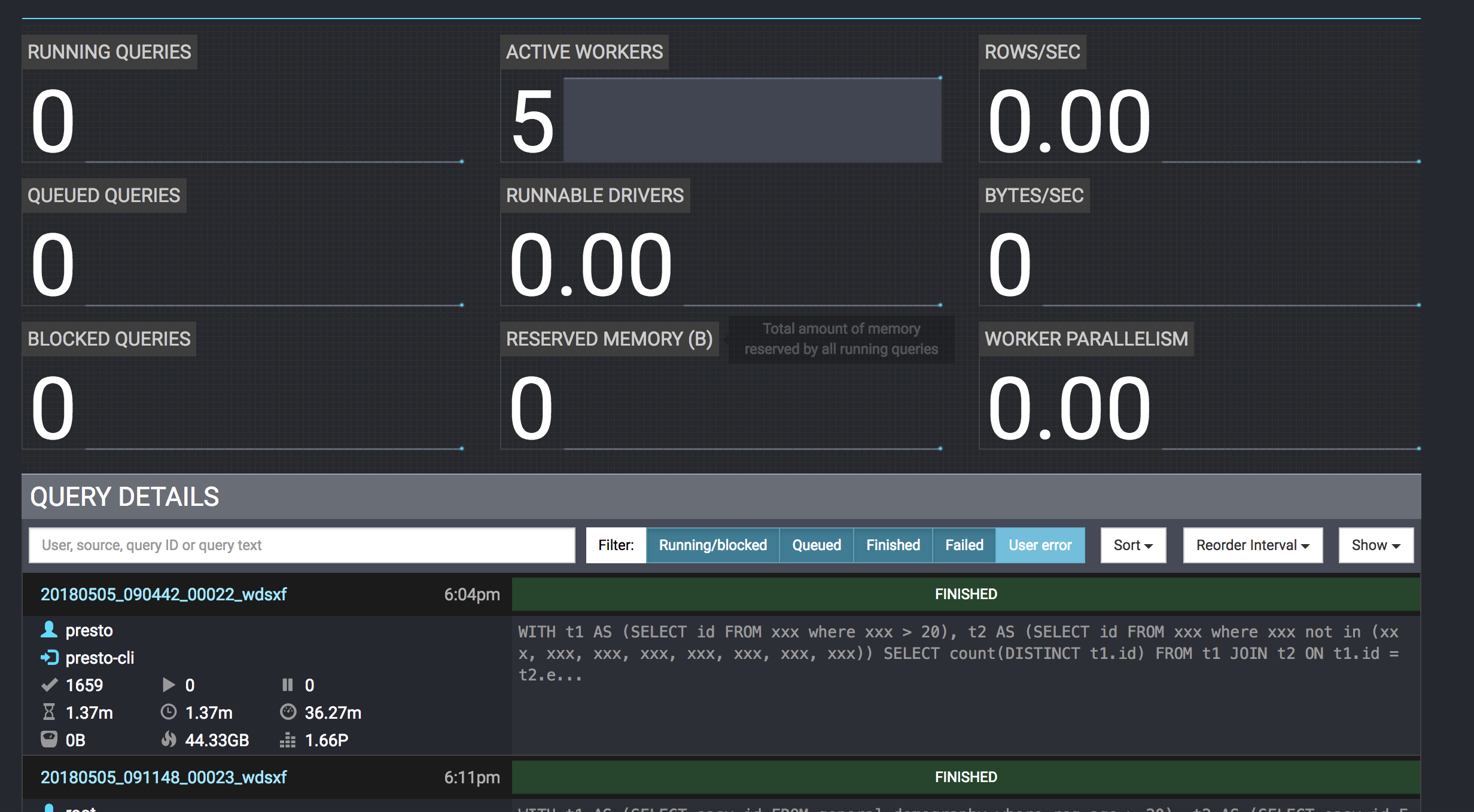
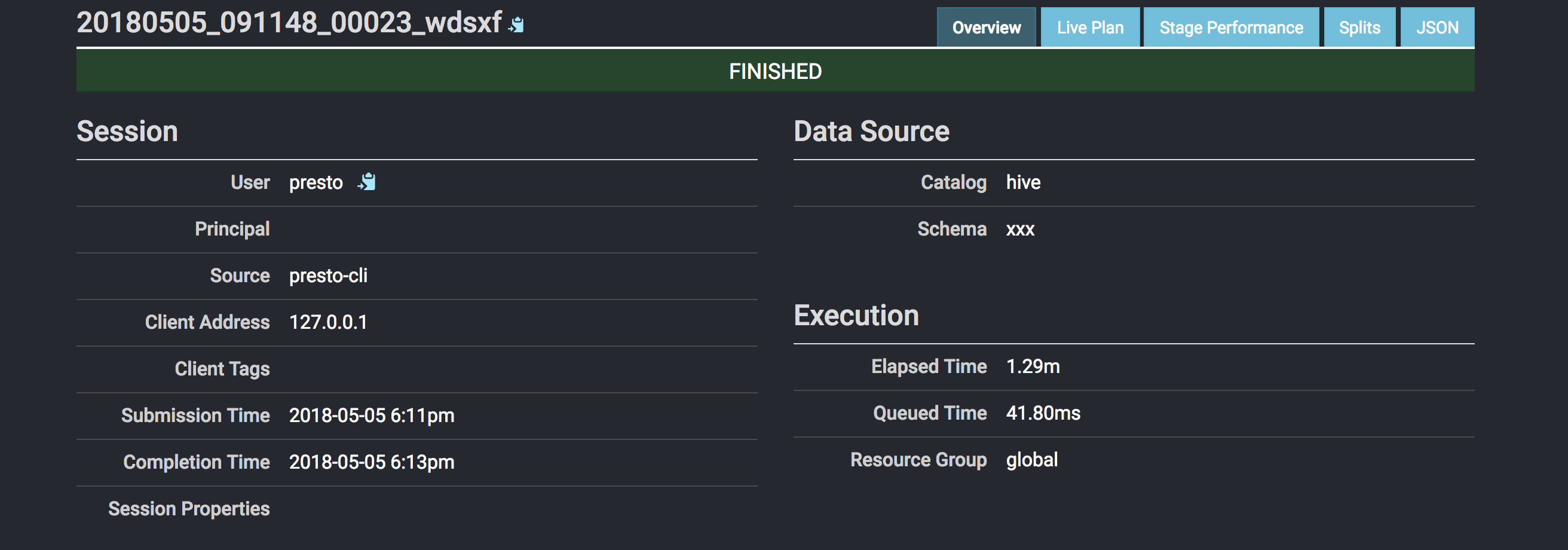
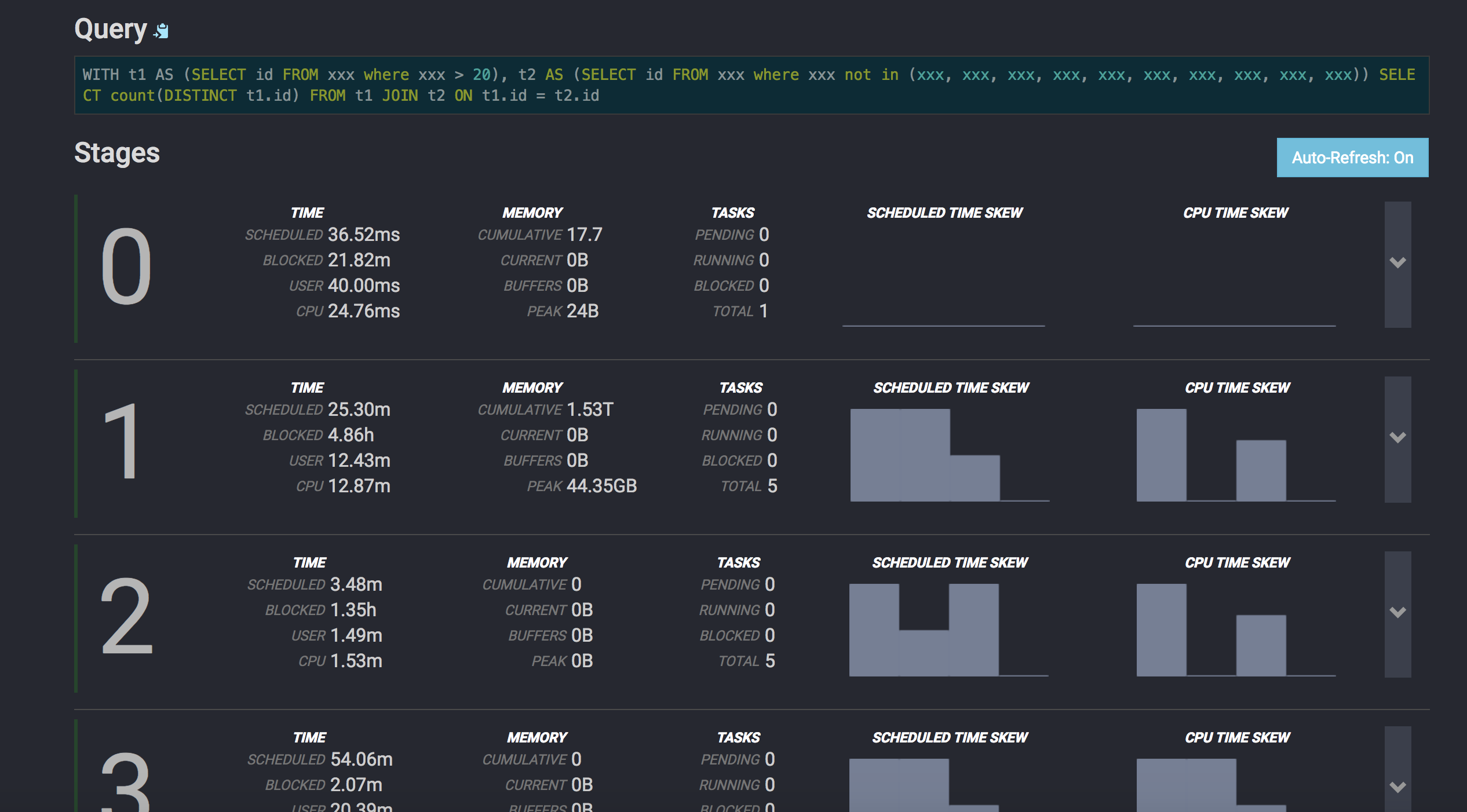
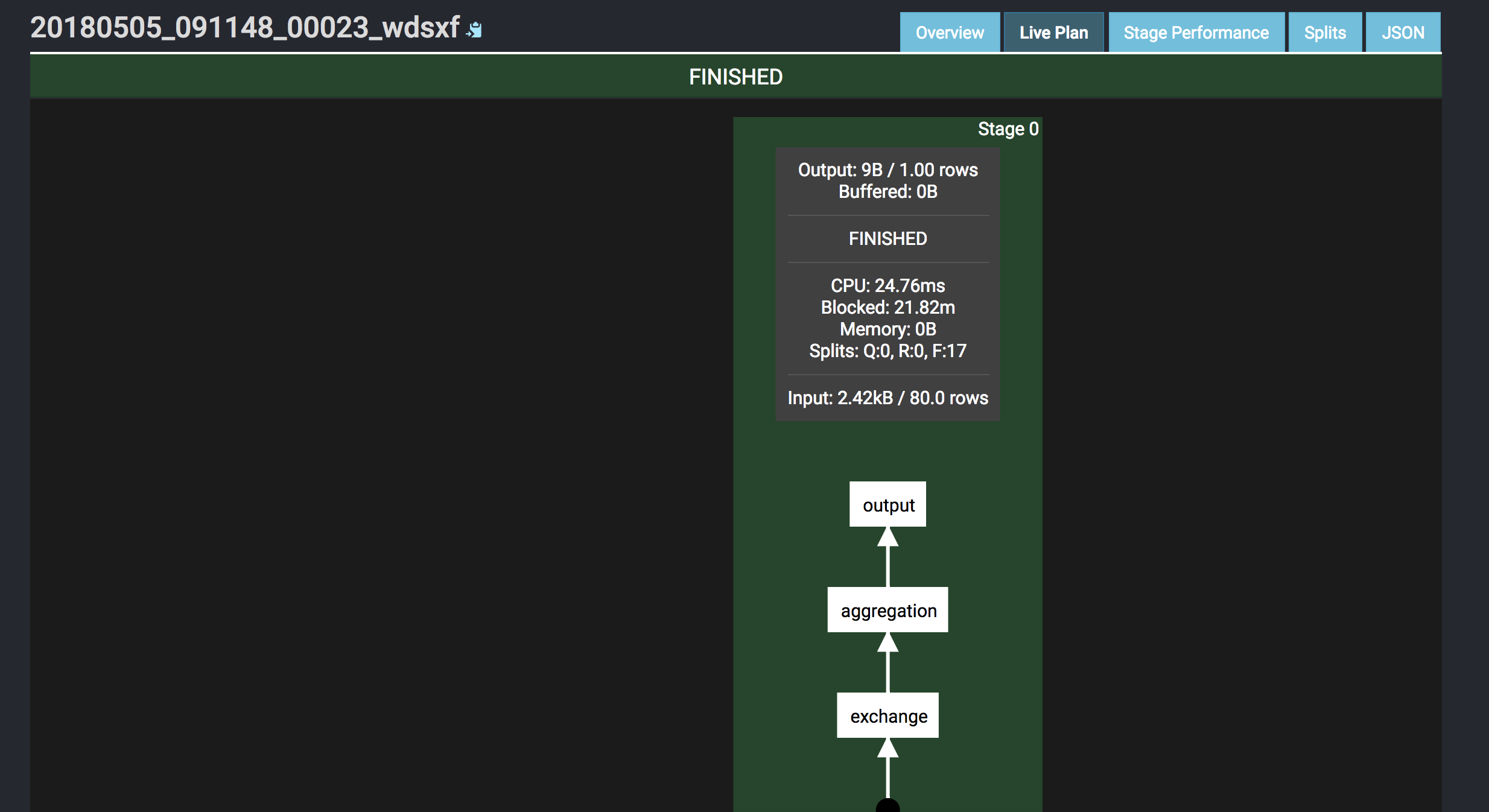
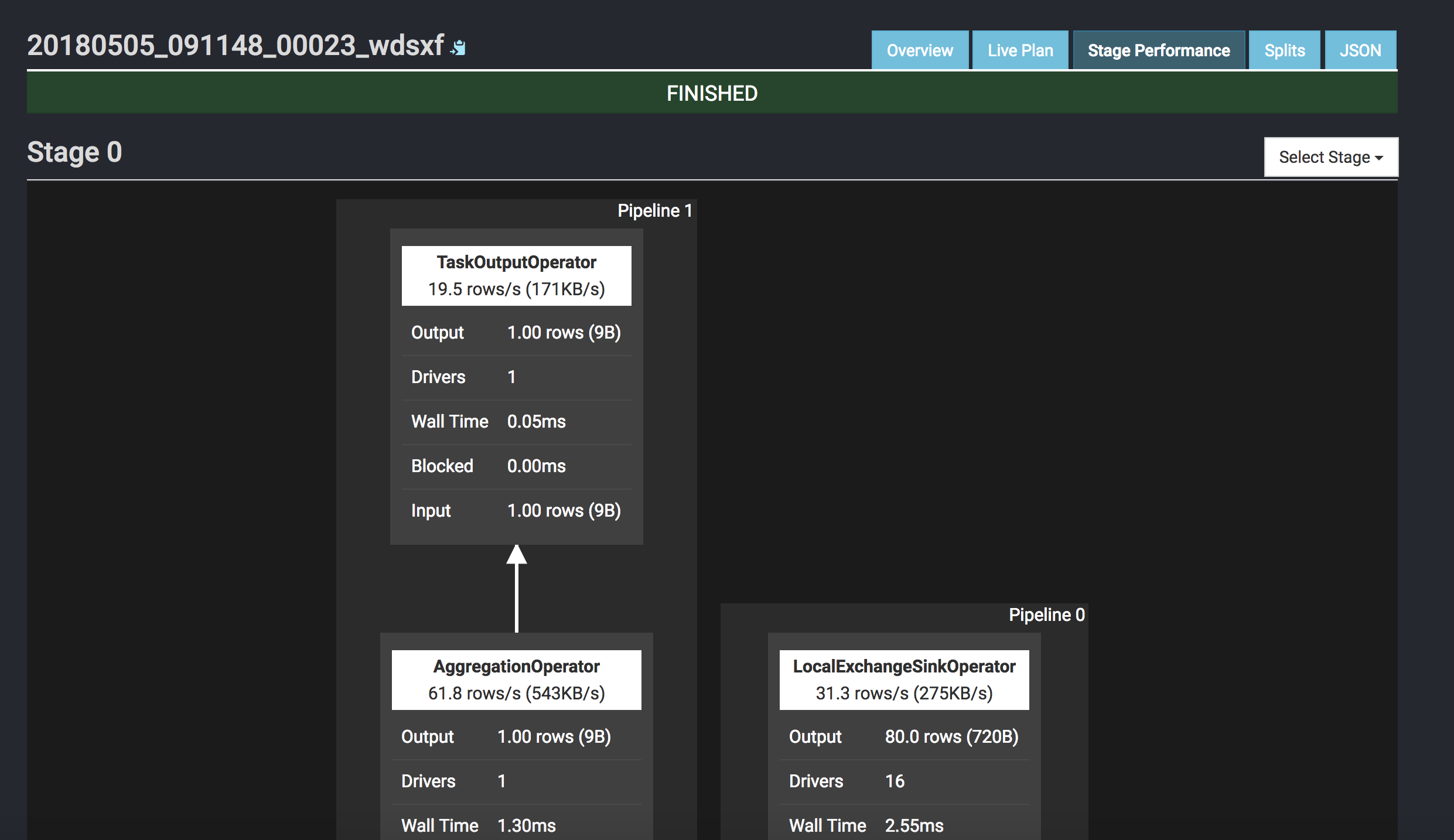
    Screenshot:


    P.S. If build cluster, pay attention to below items:

    1.node.id in node.properties in every node must be unique in the cluster, you could generate it by uuid/uuidgen.

    2.query.max-memory-per-node in config.properties better to be half of -Xmx in jvm.config.

     
  • Unknown's avatar

    Wang 20:37 on 2018-03-06 Permalink | Reply
    Tags: , Cluster, , ,   

    [Performance Test] MR vs Tez(2) 

    I test the performance of MR vs Tez again on cluster, I created a new table which contains 28,872,974 rows, below are cluster servers:

    Host

    OS

    Memory

    CPU

    Disk

    Region

    master.c.ambari-195807.internal

    CentOS 7

    13 GB

    Intel Ivy Bridge: 2

    200G

    asia-east1-a

    slave1.c.ambari-195807.internal

    CentOS 7

    13 GB

    Intel Ivy Bridge: 2

    200G

    asia-east1-a

    slave2.c.ambari-195807.internal

    CentOS 7

    13 GB

    Intel Ivy Bridge: 2

    200G

    asia-east1-a

    slave3.c.ambari-195807.internal

    CentOS 7

    13 GB

    Intel Ivy Bridge: 2

    200G

    asia-east1-a

    1.MR

    1.1.create table

    hive> CREATE TABLE gbif.gbif_0004998
        > STORED AS ORC
        > TBLPROPERTIES("orc.compress"="snappy")
        > AS SELECT * FROM gbif.gbif_0004998_ori;
    WARNING: Hive-on-MR is deprecated in Hive 2 and may not be available in the future versions. Consider using a different execution engine (i.e. spark, tez) or using Hive 1.X releases.
    Query ID = gizmo_20180225064259_8df29800-b260-48f5-a409-80d6ea5200ad
    Total jobs = 1
    Launching Job 1 out of 1
    Number of reduce tasks is set to 0 since there's no reduce operator
    Starting Job = job_1519536795015_0001, Tracking URL = http://master.c.ambari-195807.internal:8088/proxy/application_1519536795015_0001/
    Kill Command = /opt/apps/hadoop-2.8.3/bin/hadoop job  -kill job_1519536795015_0001
    Hadoop job information for Stage-1: number of mappers: 43; number of reducers: 0
    2018-02-25 06:43:15,110 Stage-1 map = 0%,  reduce = 0%
    2018-02-25 06:44:15,419 Stage-1 map = 0%,  reduce = 0%, Cumulative CPU 231.6 sec
    2018-02-25 06:44:36,386 Stage-1 map = 2%,  reduce = 0%, Cumulative CPU 380.45 sec
    2018-02-25 06:44:37,810 Stage-1 map = 3%,  reduce = 0%, Cumulative CPU 386.09 sec
    2018-02-25 06:44:41,695 Stage-1 map = 5%,  reduce = 0%, Cumulative CPU 422.02 sec
    ...
    ...
    2018-02-25 06:47:36,112 Stage-1 map = 97%,  reduce = 0%, Cumulative CPU 1388.9 sec
    2018-02-25 06:47:38,185 Stage-1 map = 98%,  reduce = 0%, Cumulative CPU 1392.1 sec
    2018-02-25 06:47:45,434 Stage-1 map = 100%,  reduce = 0%, Cumulative CPU 1402.14 sec
    MapReduce Total cumulative CPU time: 23 minutes 22 seconds 140 msec
    Ended Job = job_1519536795015_0001
    Stage-4 is selected by condition resolver.
    Stage-3 is filtered out by condition resolver.
    Stage-5 is filtered out by condition resolver.
    Moving data to directory hdfs://master.c.ambari-195807.internal:9000/user/hive/warehouse/gbif.db/.hive-staging_hive_2018-02-25_06-42-59_672_2925216554228494176-1/-ext-10002
    Moving data to directory hdfs://master.c.ambari-195807.internal:9000/user/hive/warehouse/gbif.db/gbif_0004998
    MapReduce Jobs Launched: 
    Stage-Stage-1: Map: 43   Cumulative CPU: 1402.14 sec   HDFS Read: 11519083564 HDFS Write: 1210708016 SUCCESS
    Total MapReduce CPU Time Spent: 23 minutes 22 seconds 140 msec
    OK
    Time taken: 288.681 seconds
    

    1.2.query by on condition

    hive> select count(*) as total from gbif_0004998 where mediatype = 'STILLIMAGE';
    WARNING: Hive-on-MR is deprecated in Hive 2 and may not be available in the future versions. Consider using a different execution engine (i.e. spark, tez) or using Hive 1.X releases.
    Query ID = gizmo_20180225065438_d2343424-5178-4c44-8b9d-0b28f8b701fa
    Total jobs = 1
    Launching Job 1 out of 1
    Number of reduce tasks determined at compile time: 1
    In order to change the average load for a reducer (in bytes):
      set hive.exec.reducers.bytes.per.reducer=<number>
    In order to limit the maximum number of reducers:
      set hive.exec.reducers.max=<number>
    In order to set a constant number of reducers:
      set mapreduce.job.reduces=<number>
    Starting Job = job_1519536795015_0002, Tracking URL = http://master.c.ambari-195807.internal:8088/proxy/application_1519536795015_0002/
    Kill Command = /opt/apps/hadoop-2.8.3/bin/hadoop job  -kill job_1519536795015_0002
    Hadoop job information for Stage-1: number of mappers: 5; number of reducers: 1
    2018-02-25 06:54:50,078 Stage-1 map = 0%,  reduce = 0%
    2018-02-25 06:55:02,485 Stage-1 map = 40%,  reduce = 0%, Cumulative CPU 21.01 sec
    2018-02-25 06:55:03,544 Stage-1 map = 80%,  reduce = 0%, Cumulative CPU 38.51 sec
    2018-02-25 06:55:06,704 Stage-1 map = 100%,  reduce = 0%, Cumulative CPU 49.23 sec
    2018-02-25 06:55:09,881 Stage-1 map = 100%,  reduce = 100%, Cumulative CPU 51.88 sec
    MapReduce Total cumulative CPU time: 51 seconds 880 msec
    Ended Job = job_1519536795015_0002
    MapReduce Jobs Launched: 
    Stage-Stage-1: Map: 5  Reduce: 1   Cumulative CPU: 51.88 sec   HDFS Read: 1936305 HDFS Write: 107 SUCCESS
    Total MapReduce CPU Time Spent: 51 seconds 880 msec
    OK
    2547716
    Time taken: 32.292 seconds, Fetched: 1 row(s)
    

    1.3.query by two conditions

    hive> select count(*) as total from gbif_0004998 where mediatype = 'STILLIMAGE' and year > 1900;
    WARNING: Hive-on-MR is deprecated in Hive 2 and may not be available in the future versions. Consider using a different execution engine (i.e. spark, tez) or using Hive 1.X releases.
    Query ID = gizmo_20180225081238_766d3707-7eb4-4818-860e-887c48d507ce
    Total jobs = 1
    Launching Job 1 out of 1
    Number of reduce tasks determined at compile time: 1
    In order to change the average load for a reducer (in bytes):
      set hive.exec.reducers.bytes.per.reducer=<number>
    In order to limit the maximum number of reducers:
      set hive.exec.reducers.max=<number>
    In order to set a constant number of reducers:
      set mapreduce.job.reduces=<number>
    Starting Job = job_1519545228015_0002, Tracking URL = http://master.c.ambari-195807.internal:8088/proxy/application_1519545228015_0002/
    Kill Command = /opt/apps/hadoop-2.8.3/bin/hadoop job  -kill job_1519545228015_0002
    Hadoop job information for Stage-1: number of mappers: 5; number of reducers: 1
    2018-02-25 08:17:31,666 Stage-1 map = 0%,  reduce = 0%
    2018-02-25 08:17:43,866 Stage-1 map = 20%,  reduce = 0%, Cumulative CPU 10.58 sec
    2018-02-25 08:17:46,045 Stage-1 map = 60%,  reduce = 0%, Cumulative CPU 34.12 sec
    2018-02-25 08:17:54,996 Stage-1 map = 80%,  reduce = 0%, Cumulative CPU 41.73 sec
    2018-02-25 08:17:57,126 Stage-1 map = 100%,  reduce = 0%, Cumulative CPU 51.37 sec
    2018-02-25 08:17:58,192 Stage-1 map = 100%,  reduce = 100%, Cumulative CPU 53.72 sec
    MapReduce Total cumulative CPU time: 53 seconds 720 msec
    Ended Job = job_1519545228015_0002
    MapReduce Jobs Launched: 
    Stage-Stage-1: Map: 5  Reduce: 1   Cumulative CPU: 53.72 sec   HDFS Read: 8334197 HDFS Write: 107 SUCCESS
    Total MapReduce CPU Time Spent: 53 seconds 720 msec
    OK
    2547716
    Time taken: 321.138 seconds, Fetched: 1 row(s)
    

    2.Tez

    2.1.create table

    hive> CREATE TABLE gbif.gbif_0004998
        > STORED AS ORC
        > TBLPROPERTIES("orc.compress"="snappy")
        > AS SELECT * FROM gbif.gbif_0004998_ori;
    Query ID = gizmo_20180225075657_bae527a7-7cbd-46d9-afbf-70a5adcdee7c
    Total jobs = 1
    Launching Job 1 out of 1
    Status: Running (Executing on YARN cluster with App id application_1519545228015_0001)
    
    ----------------------------------------------------------------------------------------------
            VERTICES      MODE        STATUS  TOTAL  COMPLETED  RUNNING  PENDING  FAILED  KILLED  
    ----------------------------------------------------------------------------------------------
    Map 1 .......... container     SUCCEEDED      1          1        0        0       0       0  
    ----------------------------------------------------------------------------------------------
    VERTICES: 01/01  [==========================>>] 100%  ELAPSED TIME: 639.61 s   
    ----------------------------------------------------------------------------------------------
    Moving data to directory hdfs://master.c.ambari-195807.internal:9000/user/hive/warehouse/gbif.db/gbif_0004998
    OK
    Time taken: 664.817 seconds
    

    2.2.query by one condition

    hive> select count(*) as total from gbif_0004998 where mediatype = 'STILLIMAGE';
    Query ID = gizmo_20180225080856_d1f13489-30b0-4045-bdeb-e3e5e085e736
    Total jobs = 1
    Launching Job 1 out of 1
    Status: Running (Executing on YARN cluster with App id application_1519545228015_0001)
    
    ----------------------------------------------------------------------------------------------
            VERTICES      MODE        STATUS  TOTAL  COMPLETED  RUNNING  PENDING  FAILED  KILLED  
    ----------------------------------------------------------------------------------------------
    Map 1 .......... container     SUCCEEDED      5          5        0        0       0       0  
    Reducer 2 ...... container     SUCCEEDED      1          1        0        0       0       0  
    ----------------------------------------------------------------------------------------------
    VERTICES: 02/02  [==========================>>] 100%  ELAPSED TIME: 17.91 s    
    ----------------------------------------------------------------------------------------------
    OK
    2547716
    Time taken: 19.255 seconds, Fetched: 1 row(s)
    

    2.2.query by two conditions

    hive> select count(*) as total from gbif_0004998 where mediatype = 'STILLIMAGE' and year > 1900;
    Query ID = gizmo_20180225081200_0279f8e6-544b-4573-858b-33f48bf1fa35
    Total jobs = 1
    Launching Job 1 out of 1
    Status: Running (Executing on YARN cluster with App id application_1519545228015_0001)
    
    ----------------------------------------------------------------------------------------------
            VERTICES      MODE        STATUS  TOTAL  COMPLETED  RUNNING  PENDING  FAILED  KILLED  
    ----------------------------------------------------------------------------------------------
    Map 1 .......... container     SUCCEEDED      5          5        0        0       0       0  
    Reducer 2 ...... container     SUCCEEDED      1          1        0        0       0       0  
    ----------------------------------------------------------------------------------------------
    VERTICES: 02/02  [==========================>>] 100%  ELAPSED TIME: 16.96 s    
    ----------------------------------------------------------------------------------------------
    OK
    2547716
    Time taken: 17.635 seconds, Fetched: 1 row(s)
    

    3.Summary

    Rows: 28,872,974

    TypeCreate TableQuery By One ConditionQuery By Two Conditions
    MR288.681s32.292s321.138s
    Tez664.817s19.255s17.635s

    According to the result, MR is quicker than Tez on creation, but slower than Tez on query, along with query condition’s increase, MR’s query performance became worse.

    But why MR is quicker than Tez on creation, currently I don’t know, need to be investigated later.

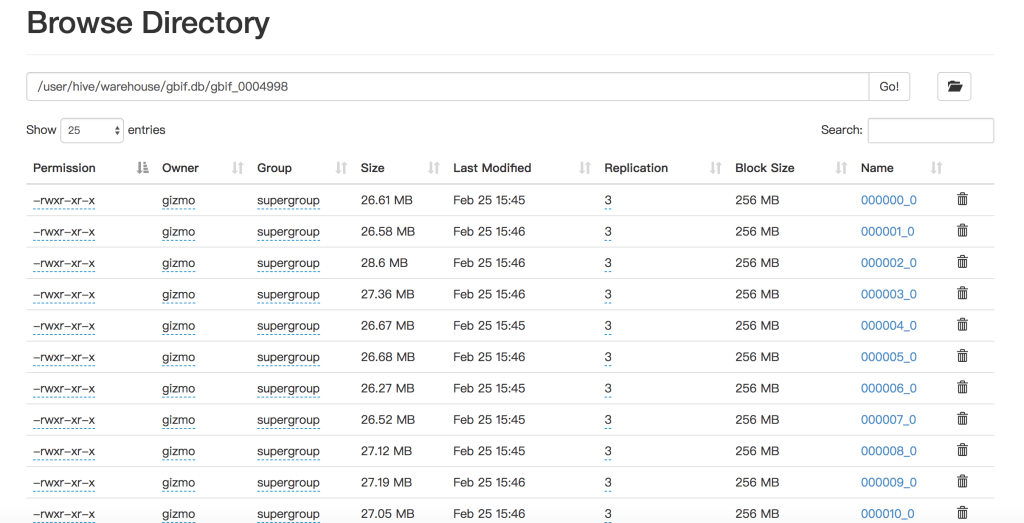
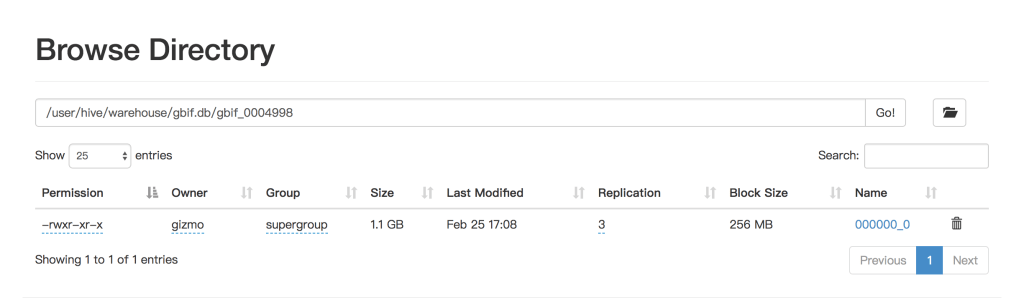
    Maybe it has relationship with storage, I have checked the filesystem after the two kinds of creation, it’s different. MR has many small files, but Tez has one much bigger file.

    MR generated files

    Tez generated files

     
  • Unknown's avatar

    Wang 21:43 on 2018-03-02 Permalink | Reply
    Tags: , , , Cluster, , , , ,   

    [GCP ] Install bigdata cluster 

    I applied google cloud for trial which give me 300$, so I initialize 4 severs to do test.

    Servers:

    Host

    OS

    Memory

    CPU

    Disk

    Region

    master.c.ambari-195807.internal

    CentOS 7

    13 GB

    Intel Ivy Bridge: 2

    200G

    asia-east1-a

    slave1.c.ambari-195807.internal

    CentOS 7

    13 GB

    Intel Ivy Bridge: 2

    200G

    asia-east1-a

    slave2.c.ambari-195807.internal

    CentOS 7

    13 GB

    Intel Ivy Bridge: 2

    200G

    asia-east1-a

    slave3.c.ambari-195807.internal

    CentOS 7

    13 GB

    Intel Ivy Bridge: 2

    200G

    asia-east1-a

    1.prepare

    1.1.configure ssh key on each slave to make master login without password

    1.2.install jdk1.8 on each server, download, set JAVA_HOME in profile

    1.3.configure hostnames in /etc/hosts on each server


    2.install hadoop

    2.1.download hadoop 2.8.2

    wget http://ftp.jaist.ac.jp/pub/apache/hadoop/common/hadoop-2.8.3/hadoop-2.8.3.tar.gz
    tar -vzxf hadoop-2.8.3.tar.gz && cd hadoop-2.8.3
    

    2.2.configure core-site.xml

    <property>
        <name>fs.default.name</name>
        <value>hdfs://master.c.ambari-195807.internal:9000</value> 
    </property>
    <property>
        <name>hadoop.tmp.dir</name>  
        <value>/data/hadoop/hdfs/tmp</value>
    </property>
    <property>
        <name>hadoop.http.filter.initializers</name>
        <value>org.apache.hadoop.security.HttpCrossOriginFilterInitializer</value>
    </property>
    

    2.3.configure hdfs-site.xml

    <property>
        <name>dfs.name.dir</name>
        <value>/data/hadoop/dfs/name</value>
    </property>
    <property>
        <name>dfs.data.dir</name>
        <value>/opt/hadoop/dfs/data</value>
    </property>
    <property>
        <name>dfs.replication</name>
        <value>3</value>
    </property>
    

    2.4.configure mapred-site.xml

    <property>  
        <name>mapred.job.tracker</name>  
        <value>master.c.ambari-195807.internal:49001</value>  
    </property>
    <property>
        <name>mapreduce.framework.name</name>  
        <value>yarn</value>  
    </property>
    <property>
        <name>mapred.local.dir</name>  
        <value>/data/hadoop/mapred</value>  
    </property>
    <property>
        <name>yarn.scheduler.minimum-allocation-mb</name>
        <value>2048</value>
    </property>
    <property>
        <name>yarn.scheduler.maximum-allocation-mb</name>
        <value>4096</value>
    </property>
      <property>
        <name>yarn.nodemanager.resource.memory-mb</name>
        <value>4096</value>
    </property>
    <property>
        <name>mapreduce.map.memory.mb</name>
        <value>4096</value>
    </property>
    <property>
        <name>mapreduce.reduce.memory.mb</name>
        <value>4096</value>
    </property>
    <property>
        <name>mapreduce.map.java.opts</name>
        <value>-Xmx6144m</value>
    </property>
    <property>
        <name>mapreduce.reduce.java.opts</name>
        <value>-Xmx6144m</value>
    </property>
    

    2.5.configure yarn-site.xml

    <property>  
        <name>yarn.resourcemanager.hostname</name>  
        <value>master.c.ambari-195807.internal</value>  
    </property>  
    <property>  
        <name>yarn.resourcemanager.address</name>  
        <value>${yarn.resourcemanager.hostname}:8032</value>  
    </property>  
    <property>  
        <name>yarn.resourcemanager.scheduler.address</name>  
        <value>${yarn.resourcemanager.hostname}:8030</value>  
    </property>  
    <property>  
        <name>yarn.resourcemanager.webapp.address</name>  
        <value>${yarn.resourcemanager.hostname}:8088</value>  
    </property>  
    <property>  
        <name>yarn.resourcemanager.webapp.https.address</name>  
        <value>${yarn.resourcemanager.hostname}:8090</value>  
    </property>  
    <property>  
        <name>yarn.resourcemanager.resource-tracker.address</name>  
        <value>${yarn.resourcemanager.hostname}:8031</value>  
    </property>  
    <property>  
        <name>yarn.resourcemanager.admin.address</name>  
        <value>${yarn.resourcemanager.hostname}:8033</value>  
    </property>  
    <property>
        <name>yarn.nodemanager.aux-services</name>
        <value>mapreduce_shuffle</value>
    </property>
    <property>
        <name>yarn.nodemanager.aux-services.mapreduce_shuffle.class</name>
        <value>org.apache.hadoop.mapred.ShuffleHandler</value>
    </property>
    <property>
        <name>yarn.timeline-service.enabled</name>
        <value>true</value>
    </property>
    <property>
        <name>yarn.resourcemanager.system-metrics-publisher.enabled</name>
        <value>true</value>
    </property>
    <property>
        <name>yarn.timeline-service.generic-application-history.enabled</name>
        <value>true</value>
    </property>
    <property>
        <name>yarn.timeline-service.http-cross-origin.enabled</name>
        <value>true</value>
    </property>
    <property>
        <name>yarn.timeline-service.hostname</name>
        <value>master.c.ambari-195807.internal</value>
    </property>
    <property>
        <name>yarn.resourcemanager.webapp.cross-origin.enabled</name>
        <value>true</value>
    </property>
    <property>
        <name>yarn.resourcemanager.address</name>
        <value>master.c.ambari-195807.internal:8032</value>
    </property>
    <property>
        <name>yarn.resourcemanager.scheduler.address</name>
        <value>master.c.ambari-195807.internal:8030</value>
    </property>
    <property>
        <name>yarn.resourcemanager.resource-tracker.address</name>
        <value>master.c.ambari-195807.internal:8031</value>
    </property>
    

    2.6.set slaves

    echo slave1.c.ambari-195807.internal >>slaves
    echo slave2.c.ambari-195807.internal >>slaves
    echo slave3.c.ambari-195807.internal >>slaves
    

    2.7.copy hadoop from master to each slave

    scp -r hadoop-2.8.3/ gizmo@slave1.c.ambari-195807.internal:/opt/apps/
    scp -r hadoop-2.8.3/ gizmo@slave2.c.ambari-195807.internal:/opt/apps/
    scp -r hadoop-2.8.3/ gizmo@slave3.c.ambari-195807.internal:/opt/apps/
    

    2.8.configure hadoop env profile

    echo 'export HADOOP_HOME=/opt/apps/hadoop-2.8.3' >>~/.bashrc
    echo 'export HADOOP_CONF_DIR=$HADOOP_HOME/etc/hadoop' >>~/.bashrc
    echo 'export PATH=$PATH:$HADOOP_HOME/sbin:$HADOOP_HOME/bin:$JAVA_HOME/bin' >>~/.bashrc
    

    2.9.start hdfs/yarn

    start-dfs.hs
    start-yarn.sh
    

    2.10.check

    hdfs, http://master.c.ambari-195807.internal:50070

    yarn, http://master.c.ambari-195807.internal:8088


    3.install hive

    3.1.download hive 2.3.2

    wget http://ftp.jaist.ac.jp/pub/apache/hive/hive-2.3.2/apache-hive-2.3.2-bin.tar.gz
    tar -zvxf apache-hive-2.3.2-bin.tar.gz && cd apache-hive-2.3.2-bin
    

    3.2.configure hive env profile

    echo 'export HIVE_HOME=/opt/apps/apache-hive-2.3.2-bin' >>~/.bashrc
    echo 'export PATH=$PATH:$HIVE_HOME/bin' >>~/.bashrc
    

    3.3.install mysql to store metadata

    rpm -ivh http://repo.mysql.com/mysql57-community-release-el7.rpm
    yum install -y mysql-server
    systemctl start mysqld
    mysql_password="pa12ss34wo!@d#"
    mysql_default_password=`grep 'temporary password' /var/log/mysqld.log | awk -F ': ' '{print $2}'`
    mysql -u root -p${mysql_default_password} -e "set global validate_password_policy=0; set global validate_password_length=4;" --connect-expired-password
    mysqladmin -u root -p${mysql_default_password} password ${mysql_password}
    mysql -u root -p${mysql_password} -e "create database hive default charset 'utf8'; flush privileges;"
    mysql -u root -p${mysql_password} -e "grant all privileges on hive.* to hive@'' identified by 'hive'; flush privileges;"
    

    3.4.download mysql driver

    wget http://central.maven.org/maven2/mysql/mysql-connector-java/5.1.45/mysql-connector-java-5.1.45.jar -O $HIVE_HOME/lib
    

    3.5.configure hive-site.xml

    <configuration>
        <property>
            <name>javax.jdo.option.ConnectionURL</name>
        </property>
        <property>
            <name>javax.jdo.option.ConnectionDriverName</name>
            <value>com.mysql.jdbc.Driver</value>
        </property>
        <property>
            <name>javax.jdo.option.ConnectionUserName</name>
            <value>hive</value>
        </property>
        <property>
            <name>javax.jdo.option.ConnectionPassword</name>
            <value>hive</value>
        </property>
    </configuration>
    

    3.6.initialize hive meta tables

    schematool -dbType mysql -initSchema
    

    3.7.test hive


    4.install tez

    4.1.please follow the instruction “install tez on single server” on each server


    5.install hbase

    5.1.download hbase 1.2.6

    wget http://ftp.jaist.ac.jp/pub/apache/hbase/1.2.6/hbase-1.2.6-bin.tar.gz
    tar -vzxf hbase-1.2.6-bin.tar.gz && cd hbase-1.2.6
    

    5.2.configure hbase-site.xml

    <property>
        <name>hbase.rootdir</name>
        <value>hdfs://master.c.ambari-195807.internal:9000/hbase</value>
    </property>
    <property>
        <name>hbase.master</name>
        <value>master</value>
    </property>
    <property>
        <name>hbase.cluster.distributed</name>
        <value>true</value>
    </property>
    <property>
        <name>hbase.zookeeper.property.clientPort</name>
        <value>2181</value>
    </property>
    <property>
        <name>hbase.zookeeper.quorum</name>
        <value>slave1.c.ambari-195807.internal,slave2.c.ambari-195807.internal,slave3.c.ambari-195807.internal</value>
    </property>
    <property>
        <name>dfs.support.append</name>
        <value>true</value>
    </property>
    <property>  
        <name>hbase.master.info.port</name>  
        <value>60010</value>  
    </property>
    

    5.3.configure regionservers

    echo slave1.c.ambari-195807.internal >>regionservers
    echo slave2.c.ambari-195807.internal >>regionservers
    echo slave3.c.ambari-195807.internal >>regionservers
    

    5.4.copy hbase from master to each slave

    5.5.configure hbase env profile

    echo 'export HBASE_HOME=/opt/apps/hbase-1.2.6' >>~/.bashrc 
    echo 'export PATH=$PATH:$HBASE_HOME/bin' >>~/.bashrc
    

    5.6.start hbase

    start-hbase.sh
    

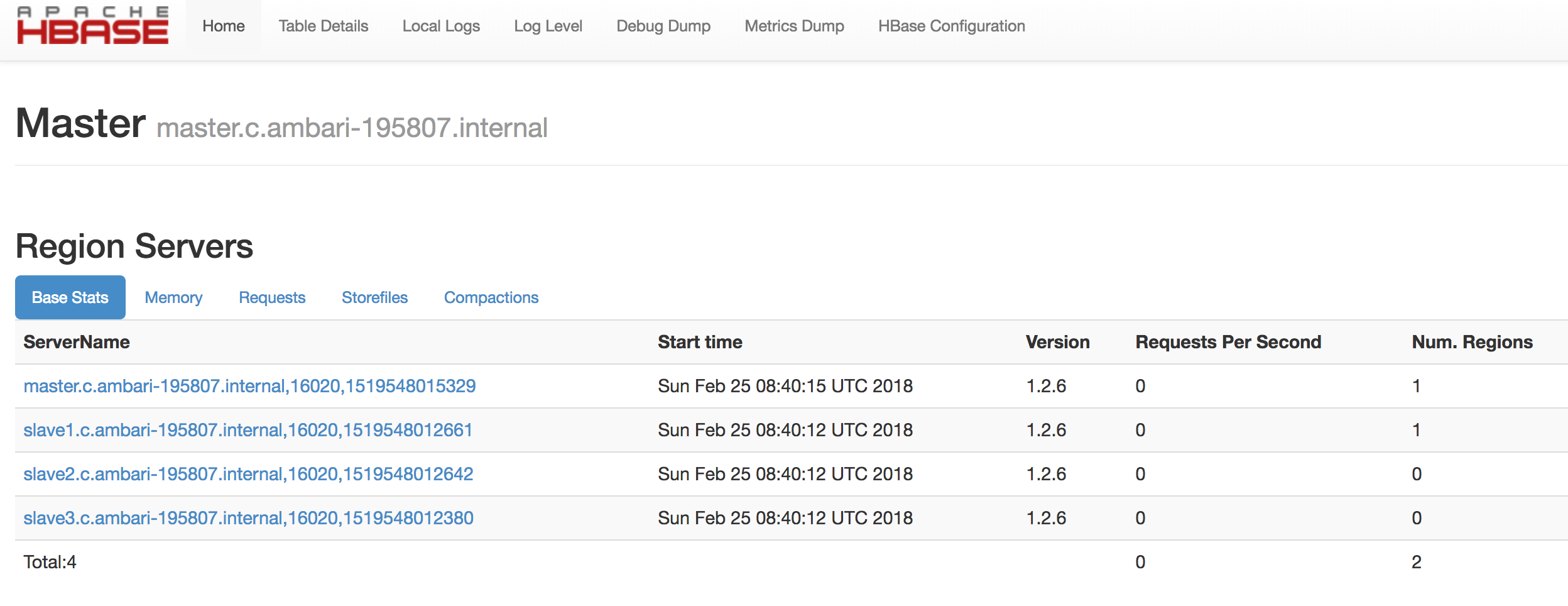
    5.7.check, http://35.194.253.162:60010


    Things done!

     
  • Unknown's avatar

    Wang 22:18 on 2018-01-26 Permalink | Reply
    Tags: , Cluster, , , Marathon, Mesos, , Zookeeper   

    Install Mesos/Marathon 

    I applied GCE recently, so I installed Mesos/Marathon for test.

    Compute Engine: n1-standard-1 (1 vCPU, 3.75 GB, Intel Ivy Bridge, asia-east1-a region)

    OS: CentOS 7

    10.140.0.1 master
    10.140.0.2 slave1
    10.140.0.3 slave2
    10.140.0.4 slave3
    

    Prepare

    1.install git

    sudo yum install -y tar wget git
    

    2.install and import apache maven repository

    sudo wget http://repos.fedorapeople.org/repos/dchen/apache-maven/epel-apache-maven.repo -O /etc/yum.repos.d/epel-apache-maven.repo
    sudo yum install -y epel-release
    sudo bash -c 'cat > /etc/yum.repos.d/wandisco-svn.repo <<EOF
    [WANdiscoSVN]
    name=WANdisco SVN Repo 1.9
    enabled=1
    baseurl=http://opensource.wandisco.com/centos/7/svn-1.9/RPMS/$basearch/
    gpgcheck=1
    gpgkey=http://opensource.wandisco.com/RPM-GPG-KEY-WANdisco
    EOF'
    

    3.install tools

    sudo yum update systemd
    sudo yum groupinstall -y "Development Tools"
    sudo yum install -y apache-maven python-devel python-six python-virtualenv java-1.8.0-openjdk-devel zlib-devel libcurl-devel openssl-devel cyrus-sasl-devel cyrus-sasl-md5 apr-devel subversion-devel apr-util-devel
    

    Installation

    1.append hosts

    cat << EOF >>/etc/hosts
    10.140.0.1 master
    10.140.0.2 slave1
    10.140.0.3 slave2
    10.140.0.4 slave3
    EOF
    

    2.zookeeper

    2.1.install zookeeper on slave1/slave2/slave3

    2.2.modify conf/zoo.cfg on slave1/slave2/slave3

    cat << EOF > conf/zoo.cfg
    tickTime=2000
    initLimit=10
    syncLimit=5
    dataDir=./data
    clientPort=2181
    maxClientCnxns=0
    autopurge.snapRetainCount=3
    autopurge.purgeInterval=0
    leaderServes=yes
    skipAcl=no
    server.1=slave1:2888:3888
    server.2=slave2:2889:3889
    server.3=slave3:2890:3890
    EOF
    

    2.3.create data folder, and write serverid to myid on slave1/slave2/slave3, id is equals server’s sequence

    mkdir data && echo ${id} > data/myid
    

    2.4.start zookeeper on slave1/slave2/slave3, check zk’s status

    bin/zkServer.sh start
    bin/zkServer.sh status
    

    3.mesos

    3.1.install and import mesos repository on each server

    rpm -Uvh http://repos.mesosphere.io/el/7/noarch/RPMS/mesosphere-el-repo-7-1.noarch.rpm
    rpm --import /etc/pki/rpm-gpg/RPM-GPG-KEY-mesosphere
    

    3.2.install mesos on each server

    yum install mesos -y
    

    3.3.modify mesos-master’s zk address on master/slave1

    echo "zk://slave1:2181,slave2:2181,slave3:2181/mesos" >/etc/mesos/zk
    

    3.4.modify quorum of mesos-master on master/slave1

    echo 2 > /etc/mesos-master/quorum
    

    3.5. start master and enable auto start on master/slave1

    systemctl enable mesos-master.service
    systemctl start mesos-slave.service
    

    3.6.start slave and enable auto start on slave1/slave2/slave3

    systemctl enable mesos-slave.service
    systemctl start mesos-slave.service
    

    4.marathon

    4.1.install marathon on master

    yum install marathon -y
    

    4.2.config master/zk address on master

    cat << EOF >>/etc/default/marathon
    MARATHON_MASTER="zk://slave1:2181,slave2:2181,slave3:2181/mesos"
    MARATHON_ZK="zk://slave1:2181,slave2:2181,slave3:2181/marathon"
    EOF
    

    4.3.start marathon and enable auto start on master

    systemctl enable marathon.service
    systemctl start marathon.service
    

    Test

    mesos: http://master:5050

    marathon: http://master:8080w

     
c
Compose new post
j
Next post/Next comment
k
Previous post/Previous comment
r
Reply
e
Edit
o
Show/Hide comments
t
Go to top
l
Go to login
h
Show/Hide help
shift + esc
Cancel