Tagged: Hadoop Toggle Comment Threads | Keyboard Shortcuts

  • Unknown's avatar

    Wang 20:34 on 2018-02-24 Permalink | Reply
    Tags: , Hadoop, ,   

    Conflicting jars of Hadoop and Tez 

    After I installed Tez, it’s ok to run hive jobs via Tez, but when I changed engine to MR, I got below error:

    WARNING: Hive-on-MR is deprecated in Hive 2 and may not be available in the future versions. Consider using a different execution engine (i.e. spark, tez) or using Hive 1.X releases.
    Query ID = wanghongmeng_20180224185414_623cf20b-77d4-4a09-a17d-41c72ed76ac3
    Total jobs = 1
    Launching Job 1 out of 1
    Number of reduce tasks determined at compile time: 1
    In order to change the average load for a reducer (in bytes):
    set hive.exec.reducers.bytes.per.reducer=<number>
    In order to limit the maximum number of reducers:
    set hive.exec.reducers.max=<number>
    In order to set a constant number of reducers:
    set mapreduce.job.reduces=<number>
    FAILED: Execution Error, return code -101 from org.apache.hadoop.hive.ql.exec.mr.MapRedTask. DEFAULT_MR_AM_ADMIN_USER_ENV
    

    I can’t see any useful information from logs, after long time’s investigating, I found hadoop-mapreduce-client-common-2.7.0.jar/hadoop-mapreduce-client-core-2.7.0.jar under Tez library were conflicting with hadoop version, my installed hadoop version was 2.8.2, so I removed the two jars.

    After doing this, I could run hive on MR successfully..😀

     
  • Unknown's avatar

    Wang 19:51 on 2018-02-24 Permalink | Reply
    Tags: , Hadoop, , , Tomcat   

    Replace MR with Tez on hive2 

    From hive2 Hive-on-MR is not recommended, you could see the warning information when running hive cli

    Hive-on-MR is deprecated in Hive 2 and may not be available in the future versions. Consider using a different execution engine (i.e. spark, tez) or using Hive 1.X releases.
    

    So I installed Tez to replace MR to run jobs, below are installation steps.

    1.install Tez

    1.1.down Tez and unpackage

    wget http://ftp.jaist.ac.jp/pub/apache/tez/0.9.0/apache-tez-0.9.0-src.tar.gz
    tar -zvxf apache-tez-0.9.0-src.tar.gz && cd apache-tez-0.9.0-src
    

    1.2.compile and build Tez jar, you need install protobuf/maven before compiling

    mvn clean package -DskipTests=true -Dmaven.javadoc.skip=true
    

    1.3.upload Tez to hdfs

    hadoop fs -mkdir /apps
    hadoop fs -copyFromLocal tez-dist/target/tez-0.9.0.tar.gz /apps/
    

    1.4.create tez-site.xml under hadoop conf directory

    cat <<'EOF' > $HADOOP_CONF_DIR/tez-site.xml
    <?xml version="1.0" encoding="UTF-8"?>
    <?xml-stylesheet type="text/xsl" href="configuration.xsl"?>
    <configuration>
        <property>
            <name>tez.lib.uris</name>
            <value>${fs.defaultFS}/apps/tez-0.9.0.tar.gz</value>
        </property>
        <property>
            <name>tez.history.logging.service.class</name>
            value>org.apache.tez.dag.history.logging.ats.ATSHistoryLoggingService</value>
        </property>
        <property>
            <name>tez.tez-ui.history-url.base</name>
            <value>http://localhost:8080/tez-ui/</value>
        </property>
    </configuration>
    EOF
    

    1.5.append configurations to yarn-site.xml

    <property>
        <name>yarn.nodemanager.aux-services</name>
        <value>mapreduce_shuffle</value>
    </property>
    <property>
        <name>yarn.nodemanager.aux-services.mapreduce_shuffle.class</name>
        <value>org.apache.hadoop.mapred.ShuffleHandler</value>
    </property>
    <property>
        <name>yarn.timeline-service.enabled</name>
        <value>true</value>
    </property>
    <property>
        <name>yarn.resourcemanager.system-metrics-publisher.enabled</name>
        <value>true</value>
    </property>
    <property>
        <name>yarn.timeline-service.generic-application-history.enabled</name>
        <value>true</value>
    </property>
    <property>
        <name>yarn.timeline-service.http-cross-origin.enabled</name>
        <value>true</value>
    </property>
    <property>
        <name>yarn.timeline-service.hostname</name>
        <value>localhost</value>
    </property>
    <property>
        <name>yarn.resourcemanager.webapp.cross-origin.enabled</name>
        <value>true</value>
    </property>
    <property>  
        <name>yarn.resourcemanager.address</name>  
        <value>localhost:8032</value>  
    </property>  
    <property>  
        <name>yarn.resourcemanager.scheduler.address</name>  
        <value>localhost:8030</value>  
    </property>  
    <property>  
        <name>yarn.resourcemanager.resource-tracker.address</name>  
        <value>localhost:8031</value>  
    </property>
    

    1.6.append configuration to core-site.xml

    <property>
        <name>fs.default.name</name>
        <value>hdfs://master:9000</value>
    </property>
    <property>
        <name>hadoop.tmp.dir</name>  
        <value>/data/hadoop/hdfs/tmp</value>
    </property>
    <property>
        <name>hadoop.http.filter.initializers</name>
        <value>org.apache.hadoop.security.HttpCrossOriginFilterInitializer</value>
    </property>
    

    1.7.unpackage tez-dist/target/tez-0.9.0-minimal.tar.gz

    1.8.append env to /etc/profile

    export TEZ_CONF_DIR="location of tez-site.xml"
    export TEZ_JARS="location of unpackaged tez-0.9.0-minimal.tar.gz"
    export HADOOP_CLASSPATH=${TEZ_CONF_DIR}:${TEZ_JARS}/*:${TEZ_JARS}/lib/*
    

    1.9.start timelineserver

    yarn-daemon.sh start timelineserver
    

    1.10.configure tez ui, install tomcat, unpackage tez-ui/target/tez-ui-0.9.0.war into webapps, rename unpackaged directory to tez-ui

    1.11.start tomcat, visit http://localhost:8080/tez-ui to test

    2.test Tez

    2.1.change job engine to Tez

    hive> set hive.execution.engine=tez;
    

    2.2.run job to test

    hive> select count(*) from gbif_0004998;
    Query ID = wanghongmeng_20180224180801_e5ddcf23-1e1a-4724-8156-1393807c2ac0
    Total jobs = 1
    Launching Job 1 out of 1
    Status: Running (Executing on YARN cluster with App id application_1519462946874_0003)
    
    ----------------------------------------------------------------------------------------------
    VERTICES MODE STATUS TOTAL COMPLETED RUNNING PENDING FAILED KILLED 
    ----------------------------------------------------------------------------------------------
    Map 1 .......... container SUCCEEDED 1 1 0 0 0 0 
    Reducer 2 ...... container SUCCEEDED 1 1 0 0 0 0 
    ----------------------------------------------------------------------------------------------
    VERTICES: 02/02 [==========================>>] 100% ELAPSED TIME: 9.87 s 
    ----------------------------------------------------------------------------------------------
    OK
    327316
    Time taken: 23.876 seconds, Fetched: 1 row(s)
    

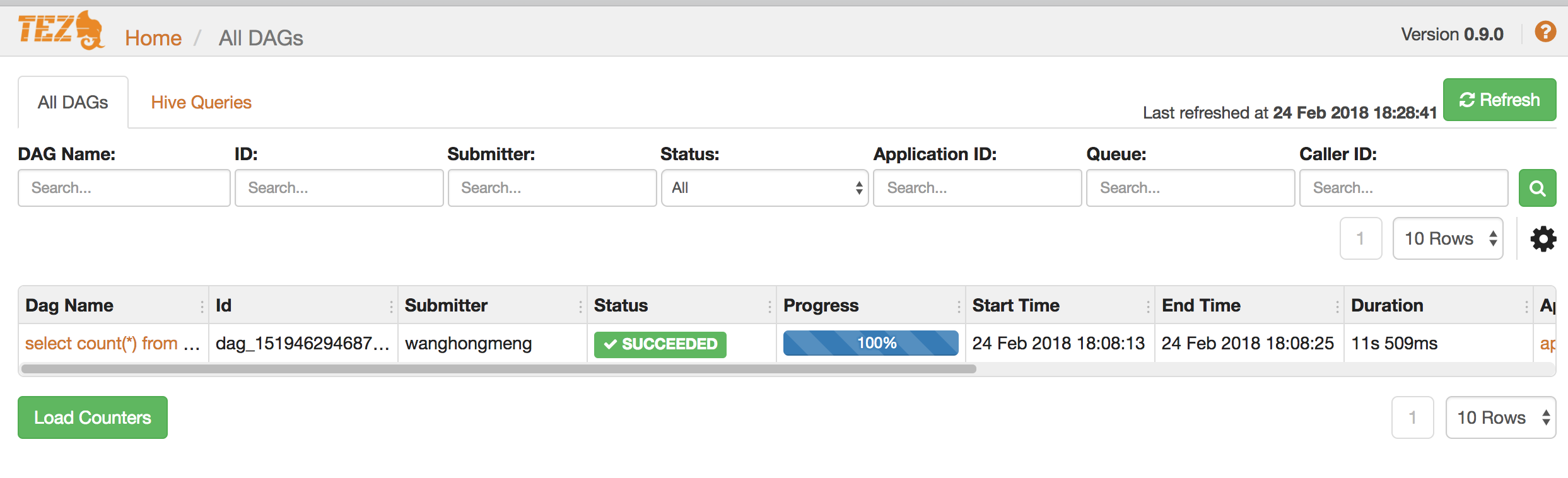
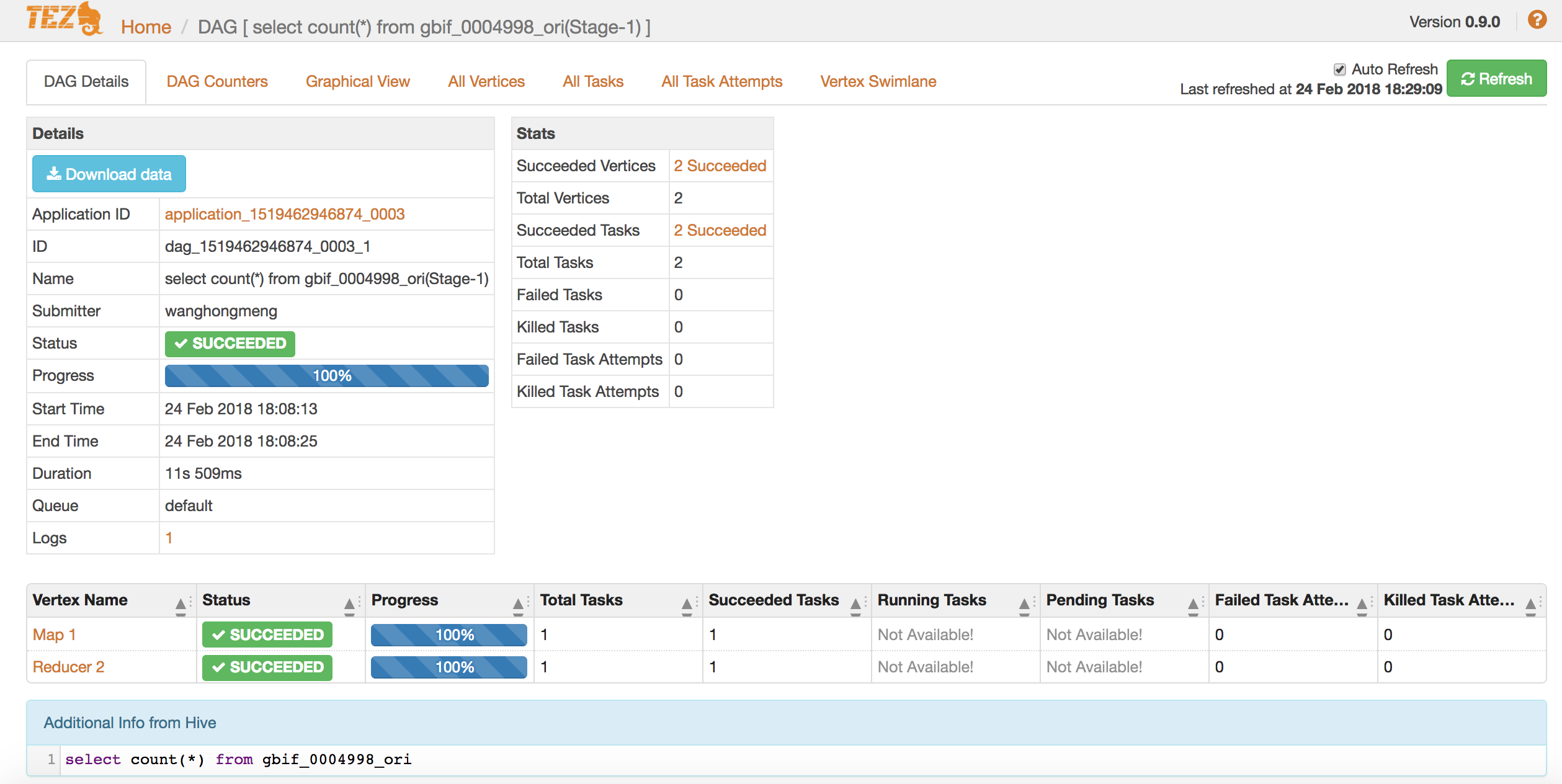
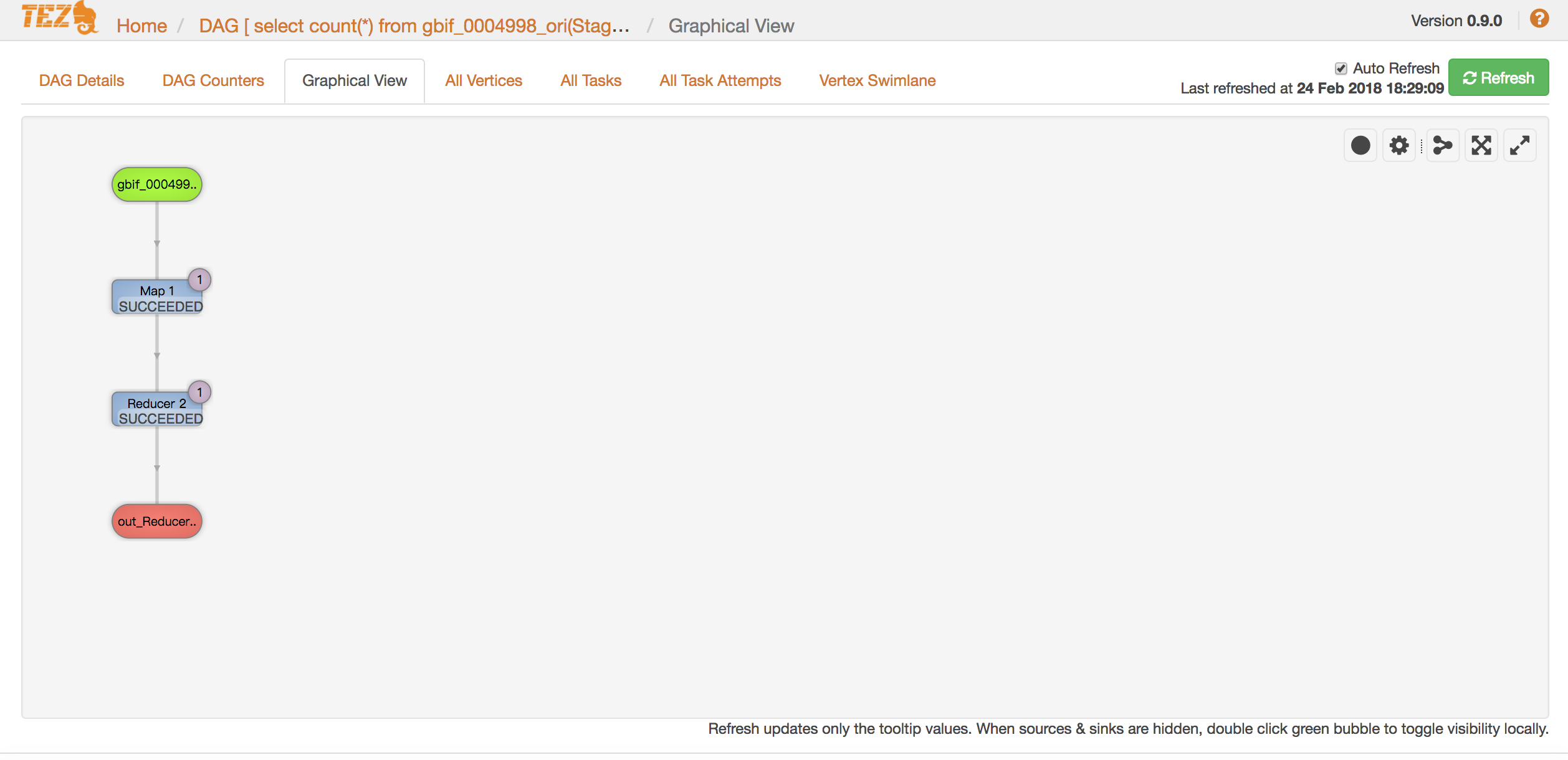
    2.3.check result on tez ui

     
  • Unknown's avatar

    Wang 22:15 on 2018-02-07 Permalink | Reply
    Tags: , Hadoop,   

    Use GBIF’s dataset to do analysis 

    GBIF, global biodiversity information facility which contains huge data, I think it’s good to do analysis with gbif’s data sample.

    Please follow the web’s instruction to download the sample dataset.

    After doing this, I imported the dataset into hive, below are the steps.

    1.create hdfs path

    hdfs dfs -mkdir -p /user/hive/gbif/0004998
    

    2.upload dataset into hdfs’s directory which was created on step 1

    hdfs dfs -copyFromLocal /Users/wanghongmeng/Desktop/0004998-180131172636756.csv /user/hive/gbif/0004998
    

    3.create hive table and load dataset

    CREATE EXTERNAL TABLE gbif_0004998_ori (
    gbifid string,
    datasetkey string,
    occurrenceid string,
    kingdom string,
    ...
    ...
    establishmentmeans string,
    lastinterpreted string,
    mediatype string,
    issue string)
    ROW FORMAT DELIMITED 
    FIELDS TERMINATED BY 't'
    STORED as TEXTFILE
    LOCATION '/user/hive/gbif/0004998'
    tblproperties ('skip.header.line.count'='1');
    

    4.create new hive table by snappy compression, then drop origin table

    CREATE TABLE gbif.gbif_0004998
    STORED AS ORC
    TBLPROPERTIES("orc.compress"="snappy")
    AS SELECT * FROM gbif.gbif_0004998_ori;
    
    drop table gbif.gbif_0004998_ori;
    

    5.check hive table’s infomation

    hive> desc formatted gbif_0004998;
    OK
    # col_name data_type comment 
    
    gbifid string 
    datasetkey string 
    occurrenceid string 
    kingdom string 
    phylum string 
    ...
    ...
    # Detailed Table Information 
    Database: gbif 
    Owner: wanghongmeng 
    CreateTime: Wed Feb 7 21:28:25 JST 2018 
    LastAccessTime: UNKNOWN 
    Retention: 0 
    Location: hdfs://localhost:9000/user/hive/warehouse/gbif.db/gbif_0004998 
    Table Type: MANAGED_TABLE 
    Table Parameters: 
    COLUMN_STATS_ACCURATE {"BASIC_STATS":"true"}
    numFiles 1 
    numRows 327316 
    orc.compress snappy 
    rawDataSize 1319738112 
    totalSize 13510344 
    transient_lastDdlTime 1519457306 
    
    # Storage Information 
    SerDe Library: org.apache.hadoop.hive.ql.io.orc.OrcSerde 
    InputFormat: org.apache.hadoop.hive.ql.io.orc.OrcInputFormat 
    OutputFormat: org.apache.hadoop.hive.ql.io.orc.OrcOutputFormat 
    Compressed: No 
    Num Buckets: -1 
    Bucket Columns: [] 
    Sort Columns: [] 
    Storage Desc Params: 
    serialization.format 1 
    Time taken: 0.078 seconds, Fetched: 74 row(s)
    

    6.check data

    hive> select * from gbif.gbif_0004998 limit 5;
    OK
    1633594438 8130e5c6-f762-11e1-a439-00145eb45e9a KINGDOM incertae sedis EE Põhja-Kiviõli opencast mine 70488160-b003-11d8-a8af-b8a03c50a862 59.366475 26.8873 1000.0 2010-04-30T02:00Z 30 4 2010 0 FOSSIL_SPECIMEN Institute of Geology at TUT GIT 343-200 Toom CC_BY_NC_4_0 Toom 2018-02-02T20:24Z STILLIMAGE GEODETIC_DATUM_ASSUMED_WGS84;TAXON_MATCH_NONE
    1633594440 8130e5c6-f762-11e1-a439-00145eb45e9a KINGDOM incertae sedis EE Neitla Quarry 70488160-b003-11d8-a8af-b8a03c50a862 59.102247 25.762486 10.0 2012-09-12T02:00Z 12 9 2012 0 FOSSIL_SPECIMEN Institute of Geology at TUT GIT 362-272 CC_BY_NC_4_0 Toom 2018-02-02T20:24Z STILLIMAGE GEODETIC_DATUM_ASSUMED_WGS84;TAXON_MATCH_NONE
    1633594442 8130e5c6-f762-11e1-a439-00145eb45e9a KINGDOM incertae sedis EE Päri quarry 70488160-b003-11d8-a8af-b8a03c50a862 58.840459 24.042791 10.0 2014-05-23T02:00Z 23 5 2014 0 FOSSIL_SPECIMEN Institute of Geology at TUT GIT 340-303 Toom CC_BY_NC_4_0 Hints, O. 2018-02-02T20:24Z STILLIMAGE GEODETIC_DATUM_ASSUMED_WGS84;TAXON_MATCH_NONE
    1633594445 8130e5c6-f762-11e1-a439-00145eb45e9a KINGDOM incertae sedis EE Saxby shore 70488160-b003-11d8-a8af-b8a03c50a862 59.027778 23.117222 10.0 2017-06-17T02:00Z 17 6 2017 0 FOSSIL_SPECIMEN Institute of Geology at TUT GIT 362-544 Toom CC_BY_NC_4_0 Toom 2018-02-02T20:24Z STILLIMAGE GEODETIC_DATUM_ASSUMED_WGS84;TAXON_MATCH_NONE
    1633594446 8130e5c6-f762-11e1-a439-00145eb45e9a KINGDOM incertae sedis EE Saxby shore 70488160-b003-11d8-a8af-b8a03c50a862 59.027778 23.117222 10.0 2017-06-17T02:00Z 17 6 2017 0 FOSSIL_SPECIMEN Institute of Geology at TUT GIT 362-570 CC_BY_NC_4_0 Baranov 2018-02-02T20:24Z GEODETIC_DATUM_ASSUMED_WGS84;TAXON_MATCH_NONE
    Time taken: 0.172 seconds, Fetched: 5 row(s)
    
     
  • Unknown's avatar

    Wang 20:53 on 2018-01-31 Permalink | Reply
    Tags: Hadoop, , MacOS   

    Hive on macOS 

    When I run hive, I got error as below:

    Exception in thread "main" java.lang.ClassCastException: java.base/jdk.internal.loader.ClassLoaders$AppClassLoader cannot be cast to java.base/java.net.URLClassLoader
    at org.apache.hadoop.hive.ql.session.SessionState.(SessionState.java:394)
    at org.apache.hadoop.hive.ql.session.SessionState.(SessionState.java:370)
    at org.apache.hadoop.hive.cli.CliSessionState.(CliSessionState.java:60)
    at org.apache.hadoop.hive.cli.CliDriver.run(CliDriver.java:708)
    at org.apache.hadoop.hive.cli.CliDriver.main(CliDriver.java:686)
    at java.base/jdk.internal.reflect.NativeMethodAccessorImpl.invoke0(Native Method)
    at java.base/jdk.internal.reflect.NativeMethodAccessorImpl.invoke(NativeMethodAccessorImpl.java:62)
    at java.base/jdk.internal.reflect.DelegatingMethodAccessorImpl.invoke(DelegatingMethodAccessorImpl.java:43)
    at java.base/java.lang.reflect.Method.invoke(Method.java:564)
    at org.apache.hadoop.util.RunJar.run(RunJar.java:234)
    at org.apache.hadoop.util.RunJar.main(RunJar.java:148)


    I’m wired about the error that cast class in different jdk versions, I have set JAVA_HOME in profile, why I still got this error?

    I tested java version, it’s jdk1.8

    wanghongmeng:2.3.1 gizmo$ java -version
    java version "1.8.0_151"
    Java(TM) SE Runtime Environment (build 1.8.0_151-b12)
    Java HotSpot(TM) 64-Bit Server VM (build 25.151-b12, mixed mode)
    

    But when I checked jdk’s installed directory, I found /Library/Java/Home was linked to jdk9’s home, I never used jdk9, so I uninstalled jdk9, and linked /Library/Java/Home to jdk1.8’s home.

    After this, problem solved.😀😀

     
c
Compose new post
j
Next post/Next comment
k
Previous post/Previous comment
r
Reply
e
Edit
o
Show/Hide comments
t
Go to top
l
Go to login
h
Show/Hide help
shift + esc
Cancel