


Tagged: Performance Toggle Comment Threads | Keyboard Shortcuts
-
Wang
-
Wang
-
Wang
-
Wang
-
Wang
-
Wang
how to configure database connection pool
Configuring a connection pool is something that developers often get wrong. There are several, possibly counter-intuitive for some, principles that need to be understood when configuring the pool.
https://github.com/brettwooldridge/HikariCP/wiki/About-Pool-Sizing -
Wang
Chaos Engineering
Chaos Engineering is a great idea — build an automated solution/tool to randomly attempt to break a system in some way; ultimately to learn how the system behaves in such situations. Then you can use your newfound knowledge to find ways to make the system more fault tolerant during these failure conditions in the future.
From :https://medium.com/better-programming/chaos-engineering-chaos-testing-your-http-micro-services-acc99d145515- Chaos engineering in Azure: https://azure.microsoft.com/en-us/blog/inside-azure-search-chaos-engineering/
- Chaos engineering in Netflix: https://netflixtechblog.com/tagged/chaos-engineering
- Netflix chaos monkey: https://github.com/Netflix/chaosmonkey
-
Wang
Guarantee service availability in kubernetes
A good service not only provide good functionalities, but also ensure the availability and uptime.
We reinforce our service from QoS, QPS, Throttling, Scaling, Throughput, Monitoring.
Qos
There’re 3 kinds of QoS in kubernetes: Guaranteed, Burstable, BestEffort. We usually use Guaranteed, Burstable for different services.
#Guaranteed
resources:
  requests:
    cpu: 1000m
    memory: 4Gi
  limits:
    cpu: 1000m
    memory: 4Gi

#Burstable
resources:
  requests:
    cpu: 1000m
    memory: 4Gi
  limits:
    cpu: 6000m
    memory: 8Gi
QPS
We did lots of stress test on APIs by Gatling before we release them, we mainly care about mean response time, std deviation, mean requests/sec, error rate (API Testing Report), during testing we monitor server metrics by Datadog to find out bottlenecks.
We usually test APIs in two scenarios: internal, external. External testing result is much lower than internal testing because of network latency, network bandwidth and son on.
Internal testing result
================================================================================
---- Global Information --------------------------------------------------------
> request count                                     246000 (OK=246000 KO=0     )
> min response time                                     16 (OK=16     KO=-     )
> max response time                                   5891 (OK=5891   KO=-     )
> mean response time                                    86 (OK=86     KO=-     )
> std deviation                                        345 (OK=345    KO=-     )
> response time 50th percentile                         30 (OK=30     KO=-     )
> response time 75th percentile                         40 (OK=40     KO=-     )
> response time 95th percentile                         88 (OK=88     KO=-     )
> response time 99th percentile                       1940 (OK=1940   KO=-     )
> mean requests/sec                                817.276 (OK=817.276 KO=-     )
---- Response Time Distraaibution ------------------------------------------------
> t < 800 ms                                        240565 ( 98%)
> 800 ms < t < 1200 ms                                1110 (  0%)
> t > 1200 ms                                         4325 (  2%)
> failed                                                 0 (  0%)
================================================================================
External testing result
================================================================================
---- Global Information --------------------------------------------------------
> request count                                      33000 (OK=32999  KO=1     )
> min response time                                    477 (OK=477    KO=60001 )
> max response time                                  60001 (OK=41751  KO=60001 )
> mean response time                                   600 (OK=599    KO=60001 )
> std deviation                                        584 (OK=484    KO=0     )
> response time 50th percentile                        497 (OK=497    KO=60001 )
> response time 75th percentile                        506 (OK=506    KO=60001 )
> response time 95th percentile                       1366 (OK=1366   KO=60001 )
> response time 99th percentile                       2125 (OK=2122   KO=60001 )
> mean requests/sec                                109.635 (OK=109.631 KO=0.003 )
---- Response Time Distribution ------------------------------------------------
> t < 800 ms                                         29826 ( 90%)
> 800 ms < t < 1200 ms                                1166 (  4%)
> t > 1200 ms                                         2007 (  6%)
> failed                                                 1 (  0%)
---- Errors --------------------------------------------------------------------
> i.g.h.c.i.RequestTimeoutException: Request timeout after 60000      1 (100.0%)
 ms
================================================================================
Throttling
We throttle API by Nginx limit, we configured ingress like this:
annotations:
  nginx.ingress.kubernetes.io/limit-connections: '30'
  nginx.ingress.kubernetes.io/limit-rps: '60'
And it will generate Nginx configuration dynamically like this:
limit_conn_zone $limit_ZGVsaXZlcnktY2RuYV9kc2QtYXBpLWNkbmEtZ2F0ZXdheQ zone=xxx_conn:5m;
limit_req_zone $limit_ZGVsaXZlcnktY2RuYV9kc2QtYXBpLWNkbmEtZ2F0ZXdheQ zone=xxx_rps:5m rate=60r/s;

server {
    server_name xxx.xxx ;
    listen 80;

    location ~* "^/xxx/?(?<baseuri>.*)" {
        ...
        ...
        limit_conn xxx_conn 30;
        limit_req zone=xxx_rps burst=300 nodelay;
        ...
        ...
}
Scaling
We use HPA in kubernetes to ensure auto (Auto scaling in kubernetes), you could check HPA status in server:
[xxx@xxx ~]$ kubectl get hpa -n test-ns
NAME       REFERENCE             TARGETS           MINPODS   MAXPODS   REPLICAS   AGE
api-demo   Deployment/api-demo   39%/30%, 0%/30%   3         10        3          126d

[xxx@xxx ~]$ kubectl get pod -n test-ns
NAME                           READY     STATUS    RESTARTS   AGE
api-demo-76b9954f57-6hvzx      1/1       Running   0          126d
api-demo-76b9954f57-mllsx      1/1       Running   0          126d
api-demo-76b9954f57-s22k8      1/1       Running   0          126d
Throughput & Monitoring
We integrated Datadog for monitoring(Monitoring by Datadog), we could check detail API metrics from various dashboards.
Also we could calculate throughout from user, request, request time.
-
Wang
Monitoring by Datadog
We have thousands of containers running on hundreds of servers, so we need comprehensive monitoring system to monitor service and server metrics.
We investigated popular cloud monitoring platform: New Relic and Datadog, finally we decided to use datadog.
Dashboard: Datadog could detect services and configure dashboards for you automatically.
Container & Process: You could check all your containers & process in all environments clearly.
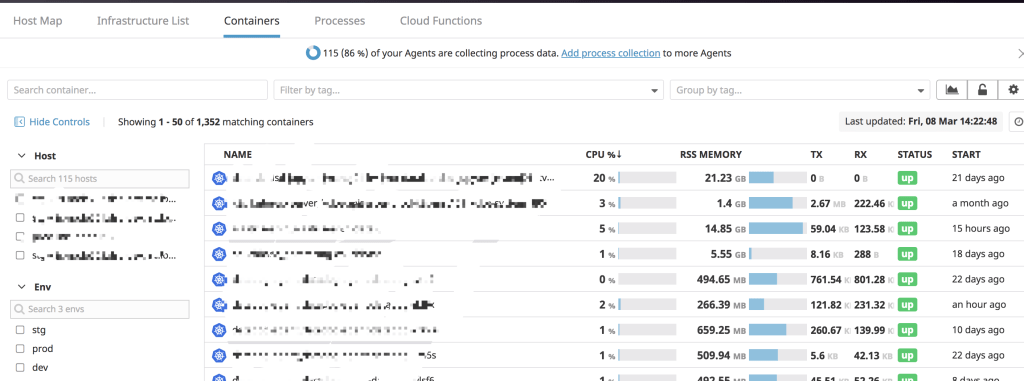
Monitors: Datadog will create monitors according to service type automatically, if it doesn’t your requirement, you could create your own. It’s also convenient to send alert message through Slack, Email.
APM: Datadog provide various charts for API analysis, also there’s Service Map which you could check service dependencies.
Synthetics: New feature in Datadog which could test your API around the world to check availability and uptime.
-
Wang
Probe in kubernetes
There’s two kinds of probe: readinessProbe, livenessProbe in kubernetes used to detect if your service is healthy.
We encountered a problem when configured readinessProbe, there’s a property named initialDelaySeconds which indicate kubernetes will start health check after specific second, we used the default value 60 which means kubernetes will check health after 60 seconds.
readinessProbe:
  initialDelaySeconds: 60
  timeoutSeconds: 5
As we deployed over 20 StatefulSet pods and these pods joined as a cluster which cost over 60 seconds, kubernetes can’t ping service successfully so that kubernetes restart these pods, thees pods restart in loop all the time.
After we increased the initialDelaySeconds to 120, everything goes fine.

 Wang's Tech Blog
Reply